
Roon needs desktop-class CPU, more RAM, and a desktop OS. It won’t run on ghe Rose (or almost any other streamer in existence).
Not “super” (mine runs on Synology 1522+ which has a rather ancient AMD chio) but it does, for any reasonably-sized library, more than 4GB of RAM that Rose has, and Roon only builds for Windows, MacOS, and Linux on either x64 oir Apple Silicon. Rose has neither, so I would consider the chances of Roon server running on any current Rose hardware to be between slim and none.
Full Roon client on the other hand (although it would have to be a custom-designed one) should be possible and would be pretty neat…
My advice - buy a Lumin streamer. The software is functioning to 100% 
1 Like
Important is to understand which information is important and what can be done with a DB and a user operated application/grafical user interface GUI.
Important for a music fan are searchable and sortable items like;
album artist/artists, track artist/artists, composer, orchestra, conductor, recording location, publisher, country of issue, year of production/recording, year of publication, Media type (CD, Vinyl, 8 track, music cassette, SACD, DVD…) which can all be digitalised, Genre/Genres, Disk #, Track # , rating (to find and filter your favorites), involved people (to find tracks/albums were an artist has played, album art (front, back picture. artist picture), times played, last played, date of addition to the DB,
So if one understands what can be saved into music files, one can also understand what the DB, Rose App shall be capable of. The Rose DB and App should be able to store, read and present all this information built in without any additional software.
Besides that, the NTFS file system is capable to read changes on disk so when new music files are stored on the Rose SSD it should be able to understand,read and show that within a few seconds.
I’ve about reached my limit with this Rose OS. I have an RS250a device. I have a small number of Hi-Def music files (161- .aiff) stored on an SSD in the device. I have run the DB scan many times and it finds all 161 files, but on about two-thirds of those it can’t find the artist or the album artwork. If I walk across the room to the device, tap Music I see a lot of albums with no artwork or artist. If I tap the picture of the Folder (showing under Music), all files have both artwork and artists. The problem is that I cannot find a picture of this Folder on my iPhone with the Hi-Fi Rose app. I CAN find the folder on my Windows laptop running the app. So, I can play music from my laptop but not my iPhone (by locating the folder on the SSD). Neither machine will play a large percentage of the music with artwork and artist name if I select Music. This has to be the lamest OS I have ever paid for.
Hi
the example with the brackets Vinyl/24.48 is a bad one. I should have used a different one.
As you mentionend earlier you tag all files properly and so you are able to find all the tagged information but not in your Rose device. The problem with Rose is, that it simply does not read all available information and saves this in the DB.
For example i have an main artist for an album and the musicians in the artists field separated by semicolons. The same happens with multiple genres were the Rose also only reads one entry.
The same again with album art for example front and back cover which i use for vinyl, only one picture is read by the Rose
For this price it is not well thought out even though other features and functions of Rose devices works well.
For example the search is rather fast once the DB is finished reading tracks/tags.
I also very much like “recommendations” feature which brings me to long forgotten music, aöbums and artists.
I used MP3tag as well but then i fully switched to Media Monkey because it is great for managing music and video collections.
1 Like
The special characters issue created all sort of problems (which I believe have now been fixed) when ripping CDs to the Rose.
Like you, Adrian, I have also gradually switched to tag files on PC/Mac, avoiding the Rose software, because it’s a minefield and you never know what could go wrong again.
By the way, since you (and others) use Roon and keep the Rose as an end point, what do you see in Roon when it comes to albums with multiple artists (these could be compilations, soundtracks or other type of collections).
Do you see in Roon these listed and ordered as ‘Various Artists’ - which is how they are tagged by the record companies?
On the Rose all these compilation records and similar appear as from one of the musicians/authors on the record, most of the times, the last one in the record, making it extremely difficult to find/search for these…
Do you see these on Roon as ‘Various Artists’, which is the correct and intended classification (and they way these are actually tagged)?
Vast overkill for music, but it should work pretty well and handle videos.
With Roon, the (low) quality of Rose’s DB setup isn’t really an issue for me, and the display is much nicer than Aurender…
Yew unfortunately Rose does not read/find all tags.
As i mentioned above the Rose does not use a multi value field tag separator for example for genres, artists, composers and so on. When Rose reads the multi value tags in the files it stops at the first entry it finds. This way it is later impossible to find the other entries in a given field. Rose does this even for images which is use on all albums. For Vinyl albums i add the back cover as well. Rose finds the back cover and stops looking for the front cover and so my Vinyl albums in Rose all show the back cover only.
Consider this as conservative expectation management…
What would you state, when you had a promise to make?
I see your point. Hopefully, this is a different story, as Rose is having a platform to serve their complete catalogue. If they build it smart and modular, I hope al of us can come a long way with their products.
There’s definitely an issue with cover art. I have ripped 100+ dvds onto a SSD on my RS250a and barely any of the cover art shows up on the main video screen. If you go to Folders though, they show. It’s really frustrating
This is an example page with the available fields of a music file just about to be written in to a FLAC file.
This information should also be read and written by the Rose DB and Client application on Windows and Android and Apple… in order to able to search, find, filter, list with the client applications and finally listen to the selection. Also some of the information like photographer is a bit to much but this is Discogs.

Hello. I hope that this update takes place sooner. You can check the method that Sony did with the HAP-Z1ES. The files are registered to the database when tranfered from the pc and only when tags are missing only then used gracenote to fill the missing tags and covers. It was slow back then but the job was perfect. Also you can edited all the tags as you pleased from the android/ios app. Every single small detail. The limitation was that you can only trasnfer files with one instance running only so that the player can register the tracks to it’s database. They had also a small windows/mac app for syncing. The database was created to it’s internal 1tb 2.5" hdd. I think that 10 years later with far more fast player in terms of cpu,ram you can do much much better things. If you cannot do it just take the advice from Sony’s developers.
Is it not really much simpler and ergonomic to edit a music/video collection on a desktop computer/notebook with a real mouse/keyboard and a tagging application.
Then to transfer the data to the internal SSD within the file system/USB and insert the SSD back into the Rose audio player and start the DB scan.
4 Likes
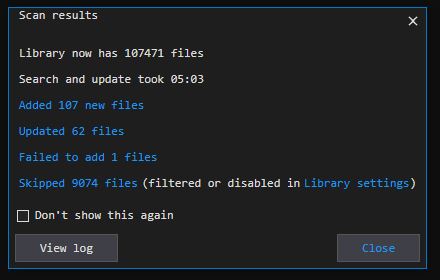
Here is an example of a DB rescan duration on my windows desktop workstation with the music management software i use. It is a HP Z620, XEON Gold, 16GB Ram and the harddisk the DB is on is a normal harddisk not a SSD.
The rescan took 5.03 minutes for more than 100’000 files music, cue, pictures, m3u, pdf, log and other information i add to an album. Each album is saved in it own directory The number 100’000 is possible because i copied my music collection 5 times to measure the performance of DB scan and handling. The actual number of files is around 20’000 FLAC files with tags, pictures and all that.
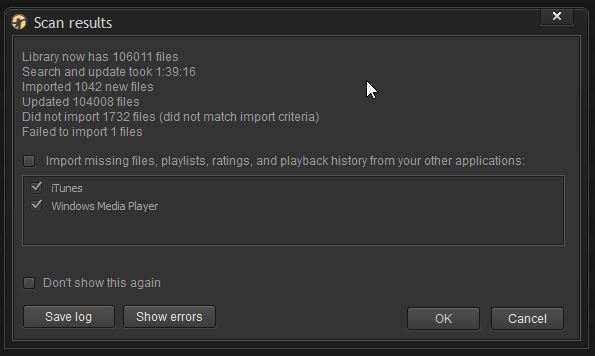
This is another scan of the same DB and music library with the older version of my media managemnt software. It takes longer as you can see because the DB and algorithms are different. The information that is read into the DB is exactly the same.
1 Like
I am sorry that I missed this “Notice” earlier. I know I’m getting to the dance a little late but I mainly have one simple request: please read all of the metadata of every file correctly. Especially Title, Album, Artist, Picture MIME Type, Picture Type (Read the Picture correctly), and do it for EVERY file. After a DB scan many of these items are missing. They are critical. This is great news for me and I look forward being able to utilize the SSD in installed.
Is there any update on this?
How about an early access of this version now, please.
StandardModel