About New 'Media Library' (DB scan)

Hello,

Many users are experiencing inconvenience regarding the database scan. The current media library has limitations in implementing various improvement requests. Therefore, we intend to create a new media library system to update the scan system. The main goals are as follows:

  1. Improve scan speed
  2. Enhance rescan speed
  3. When adding some files after scanning, only scan the newly added files

If you have other requests related to the media library, please leave a post in this thread. (Providing detailed explanations would greatly assist in the development process)
While we cannot guarantee that all requests will be implemented, we will strive to add them within the bounds of maintaining stability.

Additionally, if you have files that haven’t been scanned correctly, please send them to the following email. We will conduct pre-testing in the updated media library.

rose_service@citech.kr

We are currently aiming to complete development by the fourth quarter of the year 2024, but there may be changes depending on the development progress.

13 Likes

This are really great news!

The mentioned issues are definitely the most critical aspects regarding scan / rescan.

If I can add some more I would add ā€žAuto-Scanā€œ (automatically check / import for new files) as a nice-to-have feature (but definitely not a priority, mentioned features are much more important).

Regarding samples of files which aren’t imported (or not imported correctly) I will check within the next weeks / months and send it to the provided E-Mail.

Just as a benchmark for targeting new scan times here some ideas (or wishes). All duration times are based on a 88k files media library.

  • First scan duration: 2h (acceptable), 1h (ok), 30min (nice), 15min (as good as competition, namely Auralic)

  • Rescan duration: 1h (acceptable), 30min (ok), 15min (nice), 8min (as good as competition, namely Auralic)

  • Rescan duration only one new or a few albums: Same as rescan duration (acceptable, same as competition namely Auralic), but significantly improvement to rescan duration will be a nice bonus, e.g. 5min?

Roon scan / rescan duration times are out of scope I think because Roon use a complete different architecture with demanding CPU resources, so this should not be the expectation of the complaining ROSE customers.

3 Likes

This is great news and I’d echo everything rnderjoe has said.

I think though the Rose team have to look at this as a major opportunity as well as a response to a specific problem as I suspect it will involve a major rewrite of parts of the system. In particular, when looking at redesigning the database it would be a waste not to ensure the underlying data model didn’t include a much wider set of fields. This would then enable things like:

  • Sorting by Album Artist rather than Artist - a particular bugbear of mine as every track on a Various Artists album gets its own entry in the artists list
  • Sorting albums within an artist by release date, date added or alphabetically rather than the current, apparently random order
  • Potentially a wider range of genre descriptions
  • I’m sure there are others

I wouldn’t necessarily expect these to be available from Day 1 but the data model needs to be there to support them. Also, and I’m sure the Rose team is very aware of this, it can’t compromise the stability of the software which is one of its best points.

If Rose are looking for user input and beta testers I’d be happy to volunteer.

Thanks

Alan

8 Likes

Hi,

It would be so great to have iTunes playlists integrated stored on hard disk. M3u etc

Just reading playlist stored on hdd and creating new playlist on the device.

2 Likes

I would like to suggest a few things which may make Rose more useful for some audio aficionado.
To start i may explain my setting.

  • The boss of my audio data is a windows desktop workstation, RS 520 is the slave.
  • The software i use to manage and tag and organise the audio collection into the file system is ā€œMedia Monkey 4.0 and a discogs addon for taggingā€
  • The software i use to convert my CD’s into FLAC audio files is EAC.
  • I use ROSE 520 to play my music via an internal SSD 4TB.
  • To transfer the audio data from desktop to RS520 i connect the Rose SSD to the internal slot just like another internal harddisk of the desktop workstation and use ā€œrobocopyā€ to transfer the audio files to the SSD.
  • Then back at the RS520 i insert the SSD, start a DB scan to add the FLAC audio to the Rose DB. The first time i did that i had to wait about 24h for a filled capacity of 3 TB. The 2nd time i tried to add about 10 new FLAC audio CD album into the RS520 DB i waited more than 1.5 days and then cancled the process.

Now back to the Media Monkey 4.0, the desktop workstation and FLAC tagging which i do with an addon. This one reads and compares the FLAC audio with the discogs DB and when found writes all the tags into the FLAC files. There is a lot of information in the FLAC files which can all be seen and managed with Media Monkey on the desktop workstation. Unfortunately a lot of this information is lost in RS520 because the fields are not read properly or not at all. RS520 DB design and scan makes grave mistakes and information to find and organise my FLAC audio collection are lost.

What RS520 DB needs first of all is a user definable multiple value field separator like a semicolon which is not used much in every day language or writing ; field.separator

The DB of RS520 does not understand a separator nor does it read multi value fields. It reads tagging information from the right and stops after the first entry. The same goes for picture tags with multiple puctures like back and front cover. It reads the picture information from bottom up and stops after it finds the first picture. This is valid for any other multiple value fields like genre, multiple artist, composer, what ever. RS520 also does not understand multi disk albums or Vinyl tagging with side A, B and the order of playing such albums.
This way the search can never find all information in the tagged FLAC files and playing a vinyl album in the correct order is not possible.

Following are some screenshots with tagging and other information which i use to manage my audio collection in Media Monkey.

Well new users are not allowed to use more than one screenshot…

I think that all this information should be read into the DB of RS520 to make the device really useful…

1 Like

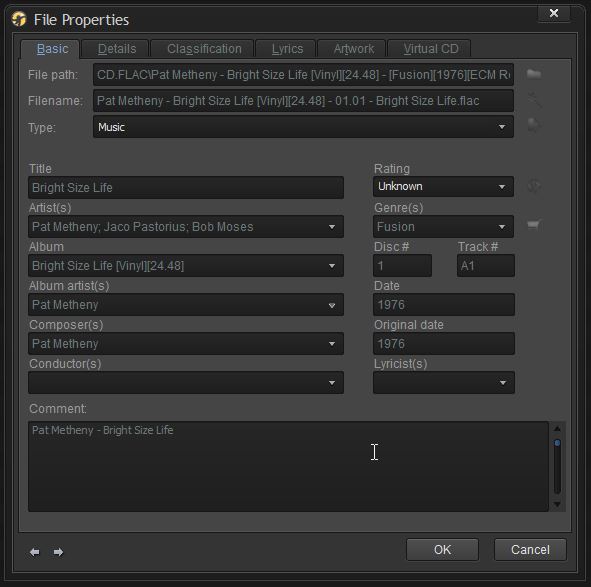
Main file properties/tag tab with path, rating etc. simply the information i use to manage my music collection and they are all as tags in the FLAC file. Notice the multiple artist entry and the main artist entry. Since this is a digitised vinyl album there is also a side A (1) and B (2) and tracks for each side. A1, A2, A3,… B1, B2, B3…

The ratings which i set on the desktop or mobile phone are not reflected in the Rose DB and are lost as well. It would be really nice to filter music by ones own rating.

The Rose DB should recognise and understand such information in order for the listener to find such information and sort, filter etc. Also notice the separator value semicolon ; between the entries

3 Likes

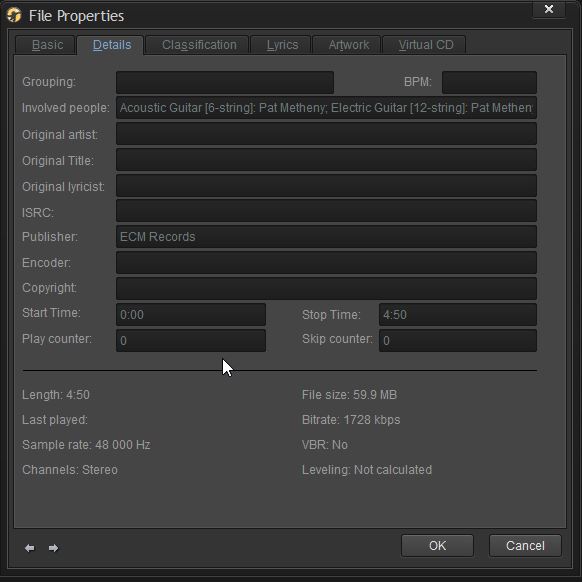
Then the 2nd properties tab with additional tag information. I like to fill the field ā€œinvolved peopleā€ and the ā€œpublisherā€. This way you can find all name entries and filter a specific publisher for a special style of music for example. I very much like the ECM…

Remind, All this information comes from the discogs DB. With it you can tag a very specific album even if there are many releases.

2 Likes

HiFi Rose streamers/transports are not for everyone. At least that’s what I perceive.

I think they are for the individual who is seriously into music. Not casually, not just to show off to friends but seriously interested in the arcane details of music. Usually that degree of interest is not skimming across the ā€œtop of the popsā€ but is dedicated to a particular genre or subgenre. The RoseConnect software should allow for each owner’s special interests to be categorized and presented to that owner the most meaningful way.

StandardModel

2 Likes

Is there any chance that only the ISO file appears in the database? Album cover and ISO file, without the tracks. This would allow us to manage the personal library more comfortably.

Regards!

Please add possibility to edit metadata in Rose Connect for local files like Album Artist, Album Title or Album Year for whole album, not for each song in this album. When music album has for example 30 songs, it take to much time to edit everything.

Next, please add possibility to sort music albums by Album Title, Album Artists, Year Album Artist Artists for local files.

Regards

I completely agree with your second paragraph.

On your first, I’m a bit wary of trying to load too much into this update. A third-party metadata editor might be a better way to go for this, at least in the short term.

1 Like

Roon needs desktop-class CPU, more RAM, and a desktop OS. It won’t run on ghe Rose (or almost any other streamer in existence).

Not ā€œsuperā€ (mine runs on Synology 1522+ which has a rather ancient AMD chio) but it does, for any reasonably-sized library, more than 4GB of RAM that Rose has, and Roon only builds for Windows, MacOS, and Linux on either x64 oir Apple Silicon. Rose has neither, so I would consider the chances of Roon server running on any current Rose hardware to be between slim and none.

Full Roon client on the other hand (although it would have to be a custom-designed one) should be possible and would be pretty neat…

My advice - buy a Lumin streamer. The software is functioning to 100% :blush:

1 Like

Important is to understand which information is important and what can be done with a DB and a user operated application/grafical user interface GUI.

Important for a music fan are searchable and sortable items like;
album artist/artists, track artist/artists, composer, orchestra, conductor, recording location, publisher, country of issue, year of production/recording, year of publication, Media type (CD, Vinyl, 8 track, music cassette, SACD, DVD…) which can all be digitalised, Genre/Genres, Disk #, Track # , rating (to find and filter your favorites), involved people (to find tracks/albums were an artist has played, album art (front, back picture. artist picture), times played, last played, date of addition to the DB,

So if one understands what can be saved into music files, one can also understand what the DB, Rose App shall be capable of. The Rose DB and App should be able to store, read and present all this information built in without any additional software.

Besides that, the NTFS file system is capable to read changes on disk so when new music files are stored on the Rose SSD it should be able to understand,read and show that within a few seconds.

I’ve about reached my limit with this Rose OS. I have an RS250a device. I have a small number of Hi-Def music files (161- .aiff) stored on an SSD in the device. I have run the DB scan many times and it finds all 161 files, but on about two-thirds of those it can’t find the artist or the album artwork. If I walk across the room to the device, tap Music I see a lot of albums with no artwork or artist. If I tap the picture of the Folder (showing under Music), all files have both artwork and artists. The problem is that I cannot find a picture of this Folder on my iPhone with the Hi-Fi Rose app. I CAN find the folder on my Windows laptop running the app. So, I can play music from my laptop but not my iPhone (by locating the folder on the SSD). Neither machine will play a large percentage of the music with artwork and artist name if I select Music. This has to be the lamest OS I have ever paid for.

Hi
the example with the brackets Vinyl/24.48 is a bad one. I should have used a different one.
As you mentionend earlier you tag all files properly and so you are able to find all the tagged information but not in your Rose device. The problem with Rose is, that it simply does not read all available information and saves this in the DB.
For example i have an main artist for an album and the musicians in the artists field separated by semicolons. The same happens with multiple genres were the Rose also only reads one entry.
The same again with album art for example front and back cover which i use for vinyl, only one picture is read by the Rose

For this price it is not well thought out even though other features and functions of Rose devices works well.
For example the search is rather fast once the DB is finished reading tracks/tags.
I also very much like ā€œrecommendationsā€ feature which brings me to long forgotten music, aƶbums and artists.

I used MP3tag as well but then i fully switched to Media Monkey because it is great for managing music and video collections.

1 Like

The special characters issue created all sort of problems (which I believe have now been fixed) when ripping CDs to the Rose.

Like you, Adrian, I have also gradually switched to tag files on PC/Mac, avoiding the Rose software, because it’s a minefield and you never know what could go wrong again.

By the way, since you (and others) use Roon and keep the Rose as an end point, what do you see in Roon when it comes to albums with multiple artists (these could be compilations, soundtracks or other type of collections).

Do you see in Roon these listed and ordered as ā€˜Various Artists’ - which is how they are tagged by the record companies?

On the Rose all these compilation records and similar appear as from one of the musicians/authors on the record, most of the times, the last one in the record, making it extremely difficult to find/search for these…

Do you see these on Roon as ā€˜Various Artists’, which is the correct and intended classification (and they way these are actually tagged)?

Vast overkill for music, but it should work pretty well and handle videos.

With Roon, the (low) quality of Rose’s DB setup isn’t really an issue for me, and the display is much nicer than Aurender…

Yew unfortunately Rose does not read/find all tags.
As i mentioned above the Rose does not use a multi value field tag separator for example for genres, artists, composers and so on. When Rose reads the multi value tags in the files it stops at the first entry it finds. This way it is later impossible to find the other entries in a given field. Rose does this even for images which is use on all albums. For Vinyl albums i add the back cover as well. Rose finds the back cover and stops looking for the front cover and so my Vinyl albums in Rose all show the back cover only.