
I downloaded the new update to 5.11 on my RS151B.
I then had to get the new app and after much trouble was able to connect to my iPad (and easily to my iPhone 17). But to do that I had to change to WiFi connection in the unit.
Now if I turn off WiFi on the unit to utilize my wired Ethernet connection the app loses contact with the unit. How do I resolve this?
@Tmort
Based on your description, it seems that when RS150B is connected via Wi-Fi, it links to the same router as your smartphone and shares the same IP range. However, when using a wired connection, it appears to connect to a different router, resulting in a different IP range.
Could you please check if the IP addresses of both the RS150B and your smartphone share the same prefix (e.g., 192.168.0.X), differing only in the last digit when connected via Ethernet?
OK, silly me I didn’t have Ethernet turned on on my hifi rose, it’s fine now!
Unrelated question, I saw on the hifi rose website that it now supports Spotify, but when I go to the rose store I don’t see the app as an option. Is it not available to my unit?
@Tmort
For Spotify, please install the official Spotify app on your smartphone and search for devices; you should see your Rose device listed. Once you select it, the audio will play through your Rose device.
But in doing that aren’t I just Bluetooth pushing it to the Hifi rose with streaming and DAC action happening at my phone?
@Tmort
As shown in the image below, it plays directly on the device via the Rose device’s network, rather than through Bluetooth.
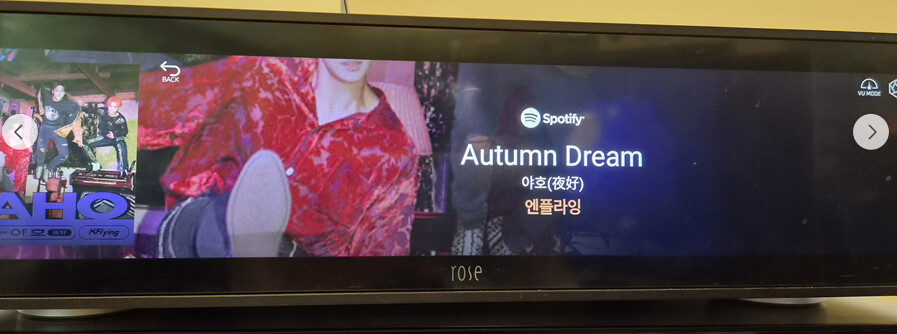
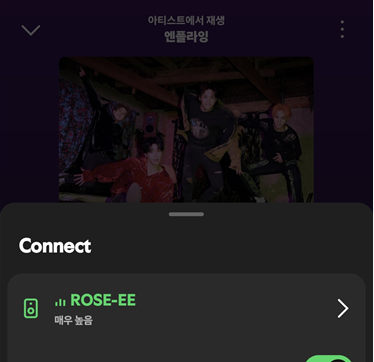
That is not how it shows up on mine, where your image has the Spotify logo mine has the “Bluetooth” logo, meaning I’m simply pushing a Bluetooth stream from my phone to the player, not a hifi type connection. What is going wrong there? Why is there not a Spotify app we can just download to the streamer like Tidal?
@Tmort
Based on what you described, it appears that your Rose device and smartphone are connected via Bluetooth.
Please turn OFF the Bluetooth function on your smartphone, ensure that both the Rose device and your smartphone are connected to the same network, and then check again.