
Lowering the upsampling rate of RD160

Hello members, trying to find the answer

Is it possible to lower the upsampling rate of my rd160 from 706.5 to a lower rez?

While playing my Cd the sound keeps cutting every now and then,
The rd160 is not able to calculate and play at 706.5 MHz…
I did not see anything online or in instructions

Thank you members.
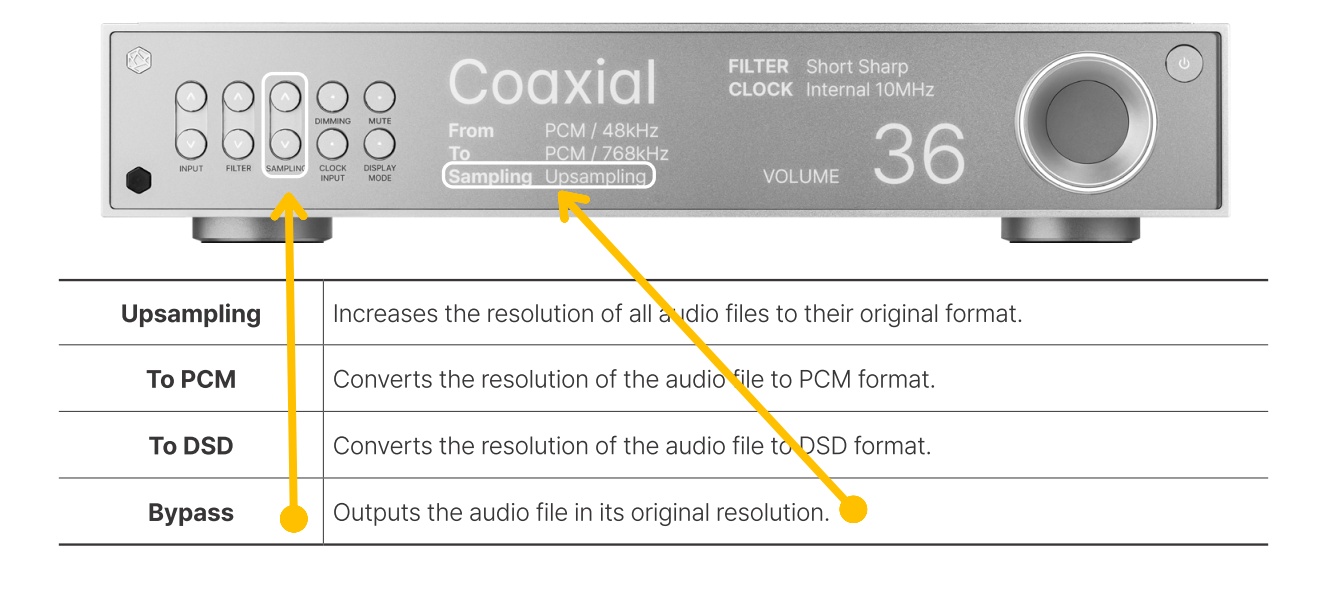
I think it is explained in the manual.
Just use front panel controls and set Bypass. See picture below
rd160-sampling

2 Likes

Sorry Serge, you did not read the question….

Hello members, trying to find the answer

Is it possible to lower the upsampling rate of my rd160 from 706.5 to a lower rez?

I need to lower the sampling bit rate from 706 to half and lower to see if it would solve the cutting of the sound.

When it plays all of a sudden it sounds like the DAC is choking and then dumps the sound and continues playing… as if it cannot calculate anymore…

Also Even during the by-pass mode, the sound cuts about every 30 to 60 seconds

Weird…

@gdp1045

It is not possible to set the upsampling rate of the RD160 to a lower value than the current options.

At this time, only the following modes are supported: Default (Bypass), To PCM, To DSD, and Upsampling (Max).

Does the same issue (audio dropouts) occur even when it is set to Default (Bypass)?

Also Even during the by-pass mode, the sound cuts about every 30 to 60 seconds

Weird…

@gdp1045

One more thing we’d like to check.

Could you please provide a detailed description of your hi-fi audio setup, including what devices your RD160 is connected to and how they are connected?
We would like to recreate a similar environment on our side for testing.