
I’m glad to hear that the issue has been resolved.
If you encounter any other problems or have further questions in the future, please feel free to let us know.
1 Like
The same problem with Tidal’s new releases is happening again: there are no new album updates. A while ago, an update was released after weeks of this feature being unavailable, and I thought it had been resolved, but unfortunately, the same problem has resurfaced. I’m wondering if it’s a problem on Rose’s end, because the new album update appeared without any updates, and now it’s gone again.
Please address this issue, because simply saying you’ll do something about it is definitely not enough.
Currently, the “Suggested New Albums” section shown in the RoseConnect Premium app is not updated directly from Tidal, because Tidal no longer provides an official API for this category.
As a workaround, we are displaying alternative “New Albums” content instead.
There is no official API available for us to support “Suggested New Albums” at this time.
However, in the upcoming RoseOne app, this section will be properly parsed and displayed, so once RoseOne is released, it will function the same way as in the official Tidal app.
For now, we unfortunately need to maintain the current behavior, but we have already contacted Tidal to request access to the “Suggested New Albums” API.
1 Like
ROSEHAN
I wanted to remind you that at least a month ago you wrote that you should contact them and discuss this issue.
And as I wrote, an update about new albums appeared two or three weeks ago…
If the Rose app is updated now, this problem should be resolved. Am I correct?
You also promised that when the Rose app is updated, the song currently playing on a given album will be bolded or otherwise highlighted, without having to search through all the songs on your tablet or smartphone.
We’re all holding you to your word.
1 Like
The feature that highlights the currently playing track within the album (for example, by bolding it or marking it in another way) is planned to be implemented in the upcoming ROSE ONE app.
2 Likes
A new app update has just been released, and I’m saddened because what you promised to do, and what other streaming companies have, is highlighting the currently playing track so you don’t have to search through dozens of tracks on the same album you’re currently listening to. This feature (very important for Rose users) is still missing, which we all regret. You’ve promised something again, and you haven’t kept your word, which is having a very negative impact on the perception of the Rose brand among users, as well as those reading this forum and considering purchasing a Rose device.
So, I ask again: when will you do it? When will we all be able to enjoy this simple feature, which means so much to Rose device users? I’m waiting for a specific answer from you.
First of all, we apologize for the inconvenience.
Please help us clarify a few points by answering the questions below.
When you play a track in the ROSE ONE app, are you saying that the currently playing track is not highlighted?
In the image below, you can see that the track currently being played is highlighted within the album.
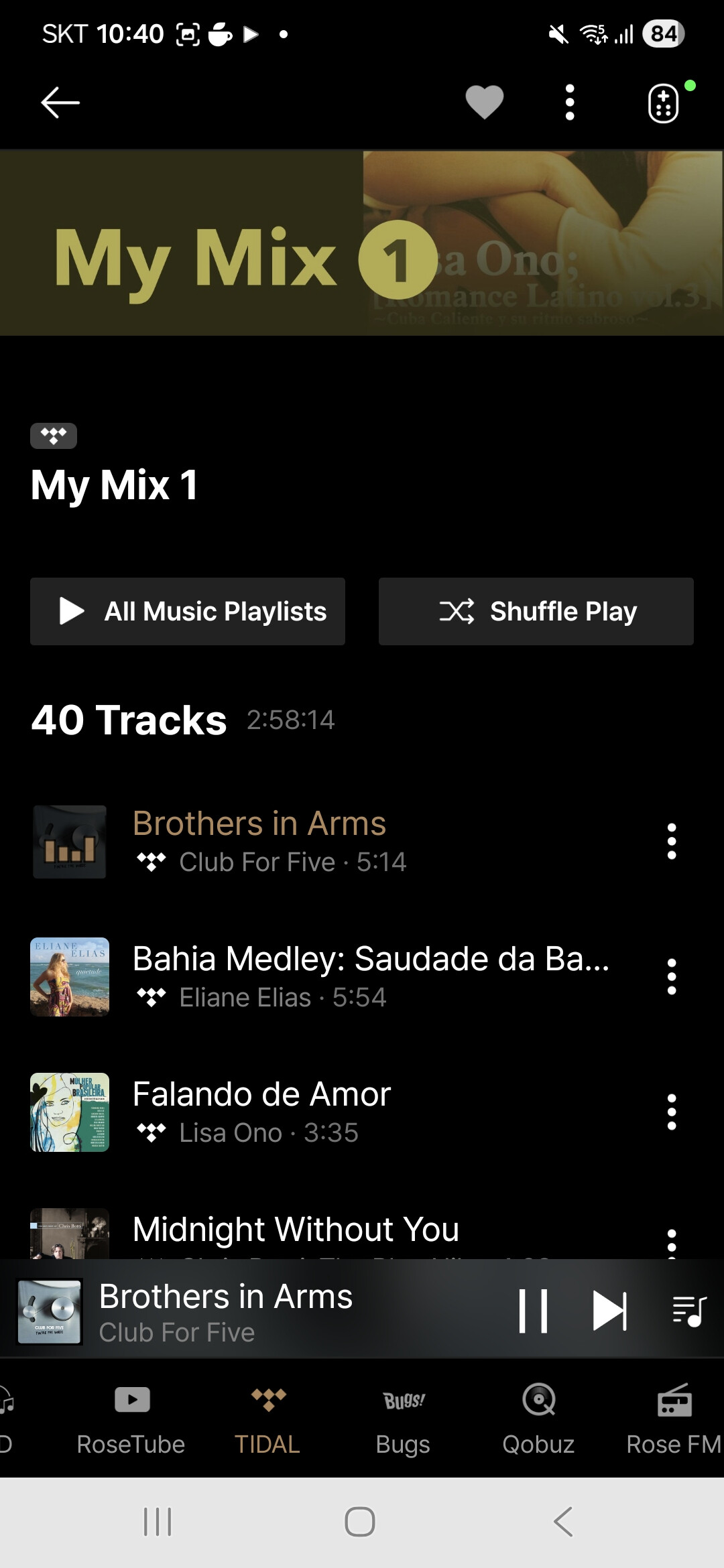
Please let us know the exact name of the app you are using, and clearly confirm whether what I described above matches the issue you are experiencing or not.
Because you think Rose only planned for this model?
You’ll have to explain to me the difference between two SSD drives that would be recognized on a PC but not on the RS151…
I tested it on my own and several of my colleagues’ audio systems. We also checked it in stores where Rose products are sold in my country. We all use the ROSE CONNECT PREMIUM 5.9.09.02 app, which is the latest version. The app runs fast and without any issues. Unfortunately, it doesn’t highlight the bold track title of the current album.
I downloaded the ROSE CONNECT ONE app today, version 1.0.3.11, and yes, the track is highlighted, just like in your photo. Unfortunately, the app works very poorly on my Android device. Sometimes I have to press a function several times for it to work. Another issue is that everything works very slowly, as if in slow motion. To make matters even worse, it performs the worst on my Samsung tablet, while on two other smartphones, it runs a bit faster and has fewer issues, although it’s still slower than with the ROSE CONNECT PREMIUM app. Additionally, the “Volume settings for each source” function has been removed from the settings in the ROSE CONECT ONE app; it’s nowhere to be found.
Our question is whether you will add the feature I mentioned to the ROSE CONECT Premium app. Many users use this app, which works flawlessly regardless of the Android version, but the only issue is that the bold track isn’t visible, or the track graph isn’t displayed like in the RCO app.
Since you were able to do this in one app, you can probably do it in the other, RCP, app, which is much faster and more responsive. Alternatively, the RCO app needs to be improved, as it currently performs poorly and is difficult to use unless it’s fixed.
1 Like
Our direction going forward is to provide users with a hybrid app that unifies iOS and Android into a single application.
The hybrid app has the advantage of allowing everything to be managed within one app. However, if the CPU performance of the iOS or Android device being used is limited, the app may run more slowly.
We will also check whether it is possible to add the requested feature to the ROSE CONNECT PREMIUM app.
Please help us by confirming the following details:
- The model name of the ROSE device you are currently using.
- The model name of your Samsung tablet.
What’s for me is not working in the Connect One app is the renaming of a device here:
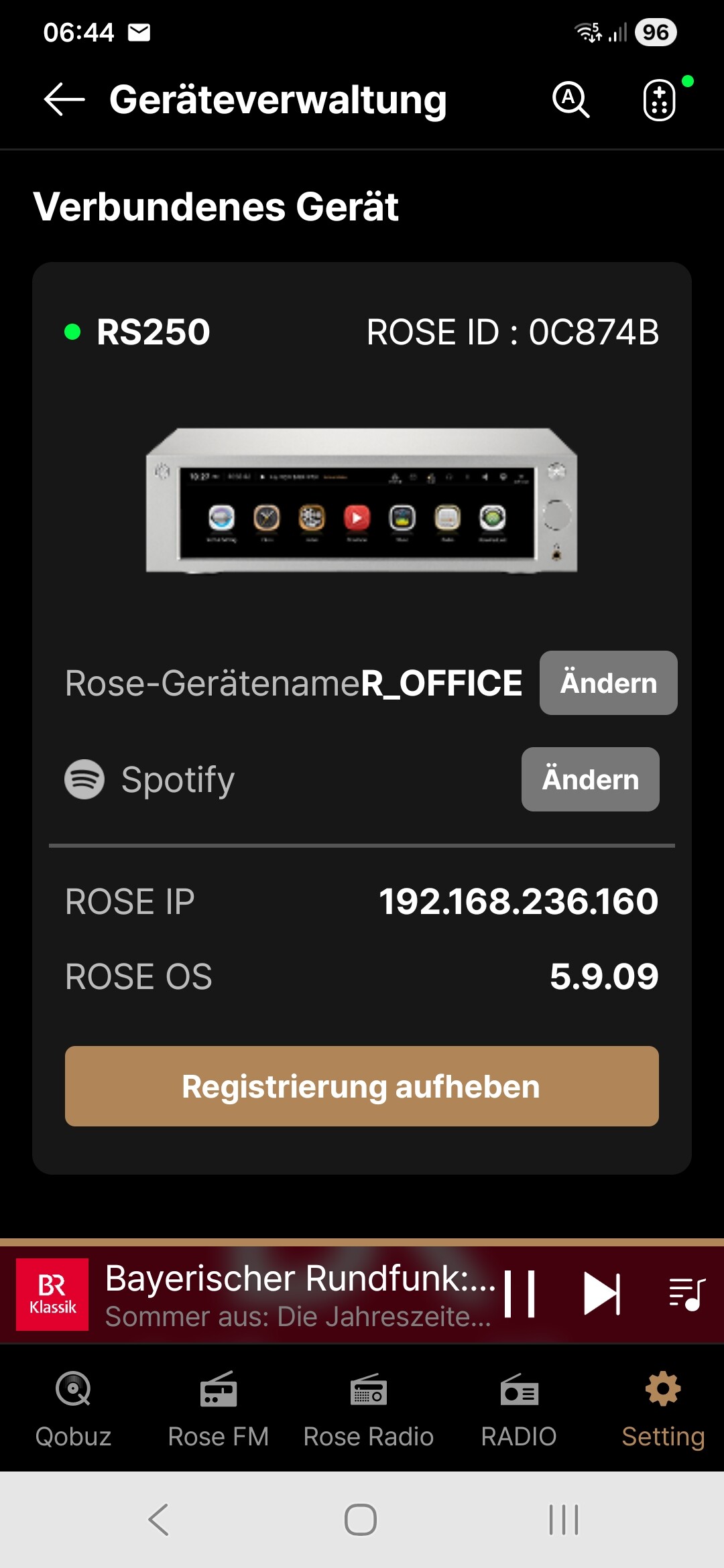
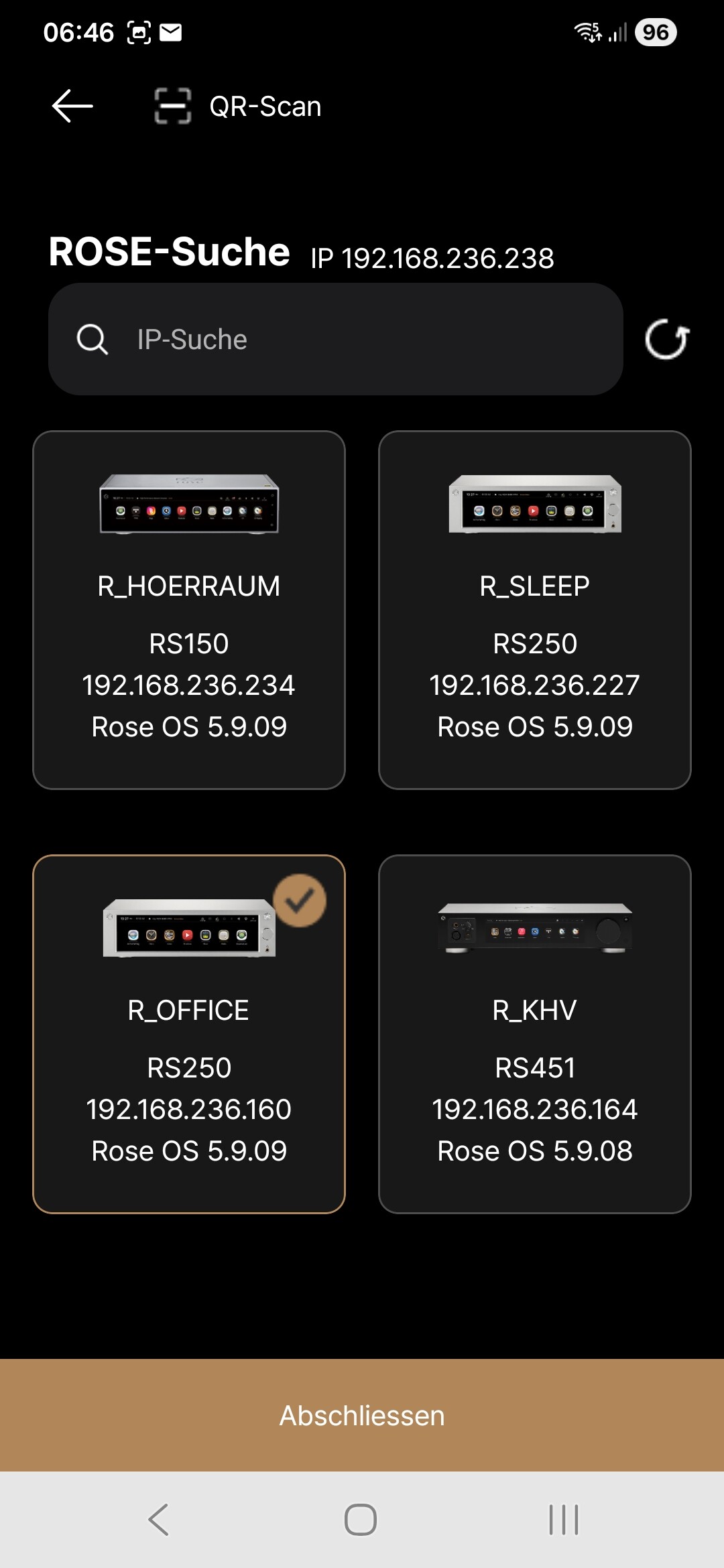
By the way: I’ve four Rose devices in the network:
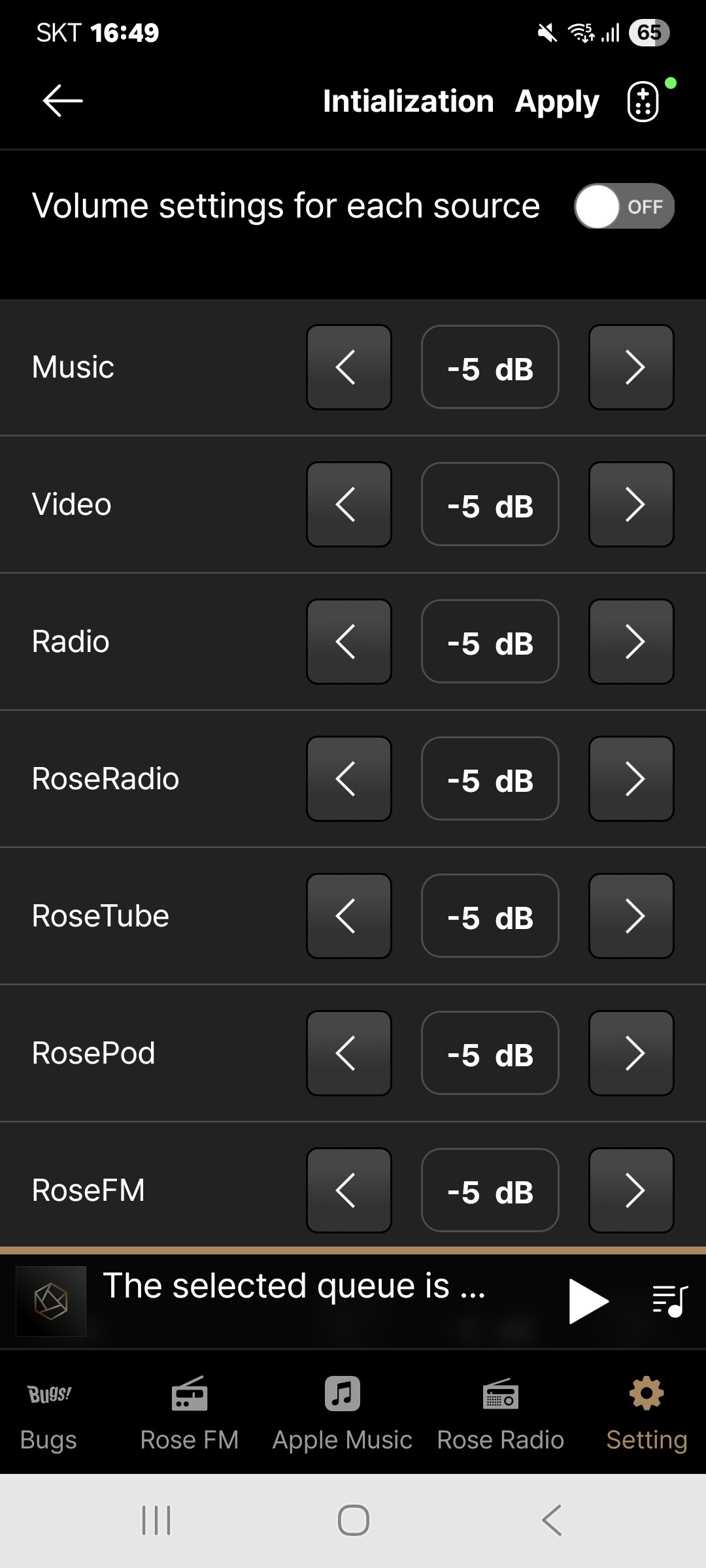
Additionally, the “Volume settings for each source” function has been removed from the settings in the ROSE CONECT ONE app; it’s nowhere to be found.
-----> The volume setting function by source can be checked as shown in the picture below.
→ Setting > Device Setting > Audio Settings > Volume settings for each source >
@burki
Thank you for sharing your experience with the app.
We will incorporate your feedback into the next version. Thank you.
It doesn’t matter to all of us what the final version of the app will be, but what matters is that it works correctly, just as it did and is on the current app. However, the Rose Connect One app doesn’t work properly, even on a relatively fast phone, not to mention a tablet. A movie or game requires more power than a regular app, so I think it’s a matter of improving the app.
The device is a Rose RS 151
Samsung A7 lite tablet
Please improve the app’s stability and make it faster, like the previous app, which many people use. Could you please add a feature to the previous app so that the user can see which song is currently playing on their tablet/smartphone?
I checked again and there is no such function on my Android, in the final audio settings there is only the Music playback options option, however there is no Volume settings function for each source.
New album updates have appeared on Tidal again. Is this really Tidal’s fault? Or is something wrong on your end? No update was released, and suddenly the new releases appeared on Tidal.
Due to hardware limitations on devices equipped with low-performance CPUs, such as the Galaxy Tab A7 Lite, we are unable to further improve stability and performance.
We anticipate that usage on devices such as the Galaxy Tab A7 Lite and Lenovo Tab Plus may be limited or not fully supported in the future.
 ROSEHAN
So let me start by saying that the Samsung A7 lite isn’t just any old tablet, and it doesn’t have any issues with Rose conect Premium. It only has trouble with the Rose One app. The same tablet supports apps from Lumin, Aurender, and several other streaming companies; only your new app has a problem. The same tablet can easily play simple games and watch a movie on Netflix, but the only problem is with your latest app, which seems unfinished.
A friend of mine has an even older tablet and can use the Lumin without any problems, so this is another example of someone not fully understanding something.
Even on a newer Xiaomi Redmi Note 13 smartphone with 8GB of RAM, it doesn’t quite handle it. It’s better than on the tablet, but it has some strange behavior. For example, when pressing “Back to Album,” it might not execute the command, or it might move to a completely different option. When pressing “Back to Album” again, it switches to that specific album. Another issue is that when there’s a longer title, the text at the end of it shakes. This wasn’t the case in the previous app. And as I mentioned earlier, there’s no option in the audio settings to adjust the volume for individual outputs. At least not on Android.
Please investigate whether you can enable the previous app to highlight the song you’re listening to and improve the new app, as it’s currently flawed. Nobody is going to buy an $800-$1000 tablet to run your app. It’s nonsense, and no one else has done this for their users.
The Xiaomi Redmi Note 13 smartphone has 8 GB of memory, and it performs better on it, but it’s also slower than the previous app, which works flawlessly regardless of Android version and memory. Furthermore, the new app can sometimes get lost, as I mentioned, meaning you press “Return to CD” or “Artys,” and it searches for something else. Plus, Android doesn’t allow you to adjust the volume on individual outputs because it doesn’t have that option.
Understand that no one will buy a tablet to play the Rose app for $600, $800, or $1000 if they don’t need it and only use it to control Rose.
Can you add the ability to see the currently playing track to the previous RCP app, which works very well for everyone? This is the third time I’ve asked, and you haven’t mentioned anything about it. Please let me know.
There was an update to the Rose One app, and now you can adjust the volume for individual outputs. Although I don’t have the update for my Samsung, there is an update for my older Android phone.
But there are still many bugs in the Rose One app. For example, if there’s a long title, it jumps around on the tablet or smartphone display. It also doesn’t always switch to what you pressed on a given disc, such as returning to the disc, when the command was moved elsewhere. So, there’s still a lot of work ahead for the developers.
I’m asking again: can a feature be added to the previous update to show the currently playing song on a given disc, as is the case in the latest update?