[Official] SW Ver 5.9 (Rose OS 5.9.08) Software Release (Only for RS451, RS151)

[Rose OS: Ver 5.9.08 Update Notice]

Update Date : Nov, 20, 2025 (Thurs) 10:00 AM (GMT +9)
Applicable Models : RS451, RS151
How to Update :
Official version users : Rose device → Settings → System Info → click “Update” to perform a system update.
Early Access version users : Rose device → Settings → System Info → Use the Official Version → click “Update” to perform a system update.
Official Update Versions :
Rose OS (SW): V5.9.08

▣ New Features / Improvements

  1. PIN code input screen now automatically displays the keypad, and a numeric keypad is applied.

  2. Added USB Reset Boost menu under USB Output settings.

  3. Improved and optimized the RS451 FIR interpolation phase filter.

  4. Fixed SignalPath errors when playing DSD with Native DSD mode enabled.

  5. Added improvements for playback errors related to RoseTube BOT authentication.

  6. Added Subtitle Encoding menu in VLC options to address subtitle issues.

  7. Fixed missing EQ icon when RS451 output is switched to HP.

  8. Added toast message when attempting to play deleted/unavailable tracks from Tidal or Qobuz in Recently Played.

  9. Added thumbnail update function when no album artwork exists in RoseServer → Album.

  10. Added Play/Pause icon refresh on the Home top bar when playback is stopped.

  11. Added mm/dd/yyyy date format option.

  12. Added wind speed unit (mph) setting option.

  13. Added manual time input option for Automatic Standby Mode.

▣ Bug Fixes

  1. Fixed repeated weather refresh toast message after exiting AOD mode.

  2. Fixed issue where album covers were not updating during Roon playback.

  3. Fixed truncated artist names in the Unified Home → Recently Played UI.

  4. Fixed issue where the Queue appeared empty after switching from Tidal → Spotify → back to Tidal.

  5. Fixed intermittent issue where RoseTube recommended content did not refresh when Auto-Play was enabled in the Queue.

  6. Fixed left-side white border artifact in RS151 VU Meter Type B.

  7. Fixed intermittent low-resolution playback on RoseTube when network speed was slow.

  8. Fixed issue where the Qobuz login loading bar did not disappear.

  9. Fixed intermittent crash when playing videos after performing a RoseTube search.

  10. Fixed UI mismatch with RoseConnect Premium when HDMI On is enabled and HDMI cable is unplugged during Tidal/Bugs video playback.

  11. Improved issue where subfolders sometimes failed to play in RoseConnect → Music.

  12. Fixed issue where Home icons temporarily shrank and then returned to normal after system reboot.

  13. Fixed issue where selecting “Play from here” incorrectly added tracks above the current track.

  14. Fixed VU Meter not working when using COAX input with Software Volume enabled.
1 Like

So, standby issue with Roon is not solved here?

What I see now with the 5.9.08:

  • playing something over Roon and pause it
  • change autostandby for the RS451 in Roon and save this change
  • this results in an empty playlist on the RS451
  • Roon’s autostandby settings are only rarely working for the RS451

@burki
Are you referring to the issue where the RS451 doesn’t enter standby mode when setting the standby time in Roon?
I’m contacting Roon about the issue where Roon doesn’t issue standby commands to the RS451. I’ll reply as soon as I get a response.

@Rose_love
There are two (possible depending) issues with the Roon standby:

  • mostly not going into standby
  • changing the standby settings in Roon for the device, empties the playlist in the RS451

What is working: Set from Roon remote the RS451 into standby.

@burki
Thank you for the explanation.
This was confirmed during internal testing.
we will confirm this with Roon and provide feedback.
Thank you.

Thank you for letting us know about the software update. I just have one question: does this update fix the mess the previous update made with the audio quality on the RS151?

Please stop saying that the previous update made no changes to the audio outputs and the operation of the DAC, because there was a before and after and I am not the only person complaining about this problem.

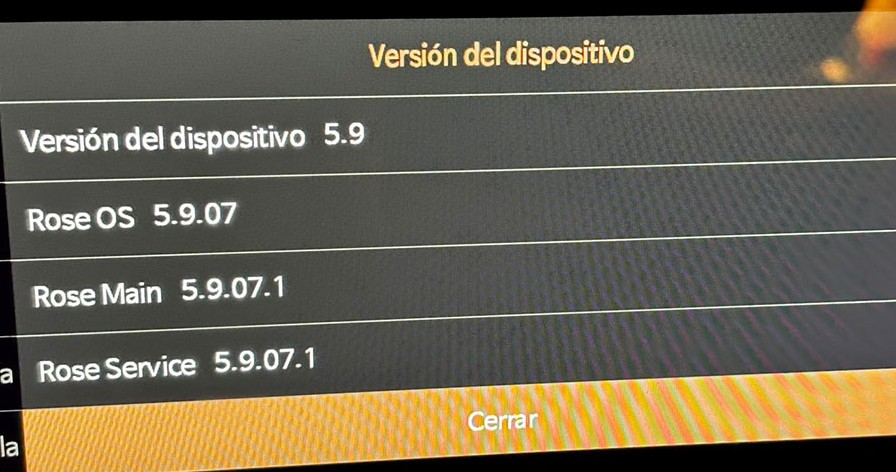
The image shows the version I have installed, which caused all the aforementioned audio issues.

UPDATE 5.9.07

Update performed on an RS151.

After restarting, the SSD is no longer recognized…

After disassembly and reassembly, it reappeared.

Hi @Razmote
The issue you described did not occur during the update test while connected to an SSD.
I will review the issue further and provide a comment if it is confirmed.

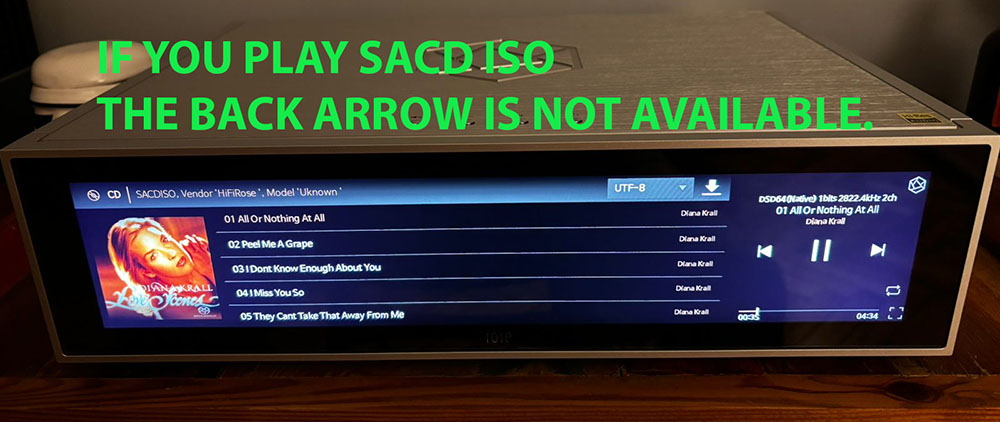
In this update, did they fix the interface problem for playing SACD ISOs?

ERROR SACD FLECHA

Successfully upgraded, but may I ask when it will be possible to support embedded QQ Music platform? If we want to do well in the huge market of China, the support of local music platforms is very important!

Hello,

The problem with the SSD disappearing is not caused by the update.

Today, I unplugged the RS151 and when I plugged it back in, the SSD was no longer visible.

I disconnected it again and it became visible once more.

Is this a problem with the device or a bug?

I was loaned an RS151 before purchasing it, so I’m not sure if it’s the device that has a problem.

Thank you.

Hi,
On the CD playback screen, the back point is the Home screen.
Both the Home button and the Back button lead to the Home screen.

Also, when playing an ISO file from Rose Connect, pressing Home will take you back to the CD playback screen afterward.

Therefore, on the screen you mentioned, a Back button is not necessary.

However, when playing an ISO file directly on the Rose device through Music → ISO, the back point is not the Home screen but the Music screen, so the Back button will be displayed.

Please keep this in mind when using the device.
Thank you.

1 Like

@Razmote
In our internal testing, the SSD disconnection issue did not occur even after more than 20 power cycles. Could you tell me how often this occurs?

Hello Rose_love,

When I insert the SSD into the RS151, it is recognized.
Then, when I put the device into standby mode and turn it back on, the SSD is recognized.

However, if I turn off the RS151, unplug the power cable, or restart it, the SSD is no longer recognized when it starts up.

The only solution is to turn off the RS151, remove the SSD, and turn it back on.
The SSD is then recognized.

If I put the SSD in a storage bay connected to a PC, it is recognized every time.

I tried formatting the drive on the RS151 or the PC, and it’s the same.

The SSD drive is a 1TB PNY.

There is a similar case with an RS250 here:
SSD not recognized - HiFi ROSE

This RS151 is on loan before purchase, but I cannot buy this device if there is a problem.

Thank you for your response.

It is recommended to use the Samsung EVO870 SSD.

Are you having any problems with the latest firmware on the RS151?

Today I updated my RS 151 from version 05 to 08. The update went quickly and smoothly. I haven’t noticed any issues after the latest update. My friends who also have RS 151s updated their RS 151s about a week ago, but they had the 07 software, and none of them have had any issues since the update. Two of them claim the sound is better with the latest update.

1 Like

@Cougar2025
Thank you for your comment. If you experience any inconvenience while using the product, please feel free to leave a comment and I will review it and respond.

I will add to my post that the lack of anomalies concerns using the player only for streaming, none of us uses the player to listen to music from files, so I have no knowledge of whether there are problems when using a disk connected to Rose RS 151 and all aspects that relate to listening to music in this way.

1 Like

@Rose_love are there any news about the Roon standby issue?