Über Nacht war kein verbinden mit lan mehr möglich. Alle Titel und Interpreten verschwunden.
Auf Win 11 läuft die App gar nicht mehr. Software ist jeweils die neueste.
Bin enttäuscht.
Jürgen Petersen

Über Nacht war kein verbinden mit lan mehr möglich. Alle Titel und Interpreten verschwunden.
Auf Win 11 läuft die App gar nicht mehr. Software ist jeweils die neueste.
Bin enttäuscht.
Jürgen Petersen
Hello,
Could you please check the following information under Rose streamer > Settings > System Info?
Hello I have the rose RS 151 .
IP: 192.168.178.42
Device ID: 0D80E8
In use is the rose connected by lan cable.
As i started the rose that morning all what was stored wasn’t there anymore. So I made an whole factory reset and started new.
Now it works again.
But I have two problems anyway.
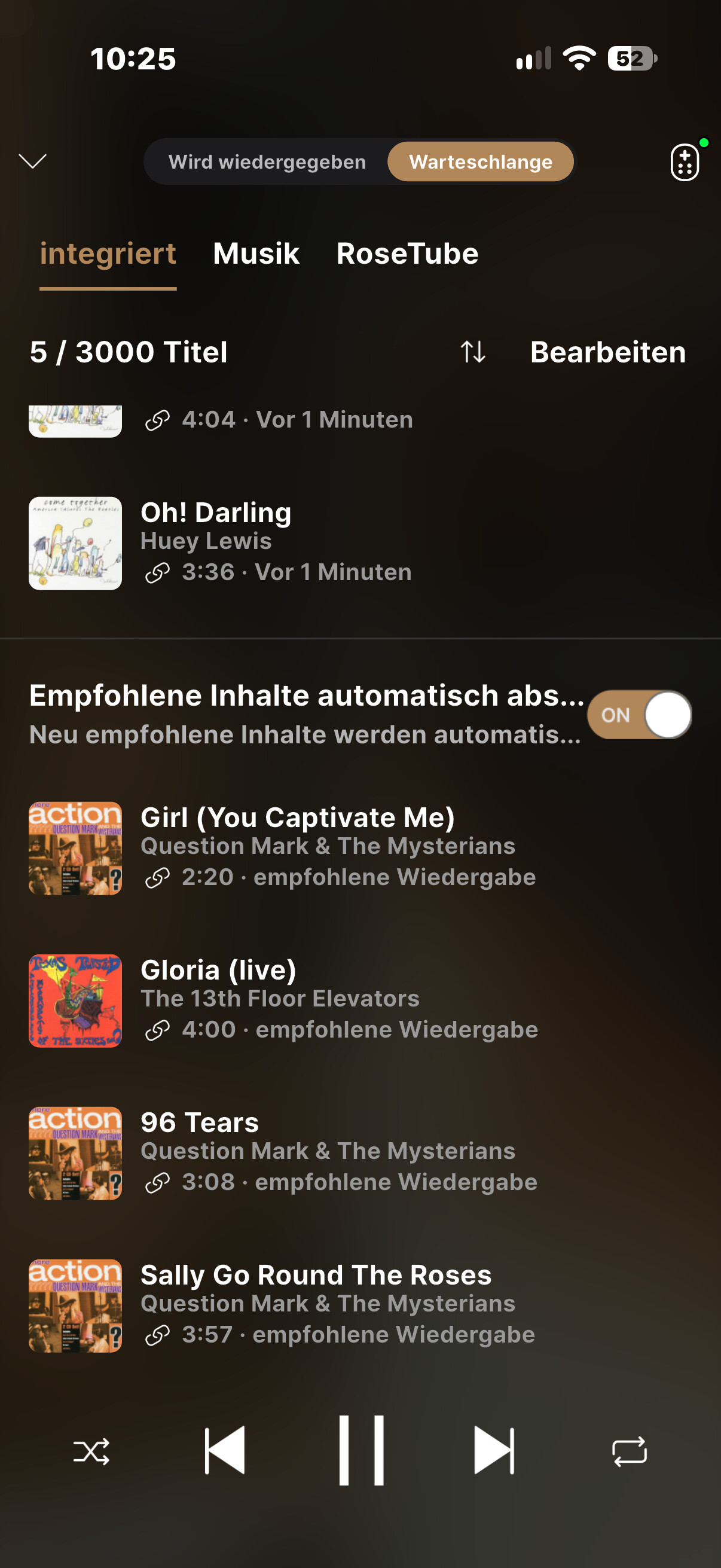
If i listen to music the system should play automatically similar songs. But the rose plays always the same album. Even before that reset. I tried to delete that. No chance. It always comes back again.
My second problem is, that if I delete albums at my Nas station, to get a better version of that album, and I scan again. The older album is still there but not playable.
And sometimes I put my special albums in a list but can’t play them.
I hope you understand that and hope you can find my mistakes.
Thanx for your support
Jürgen Petersen
Hello Jürgen,
Thank you for the detailed information. Regarding the issues you mentioned, please check the following:
1. Repeating the same album (Recommended Queue)
If you go to the Queue screen on your Rose device, you will see a Recommended queue at the bottom. You can toggle Autoplay ON/OFF for this list. The tracks in the Recommended queue are populated with songs by the same artist as the last track in your current queue. If you turn Autoplay off, these recommended tracks will disappear. Could you please confirm if this matches the behavior you are experiencing?
2. Deleted NAS albums still appearing in the library
Instead of just deleting or rescanning, could you try performing a DB Initialization (Database Reset)? This will completely clear the cached index and rebuild the library from your NAS.
3. Certain albums in playlists not playing
You mentioned that specific albums in your playlists do not play—are these albums from streaming platforms such as TIDAL or Qobuz, or are they local files stored on your NAS/SSD?
If they are local files, playback will fail if the file path, folder location, or file name has changed or if the file was moved/deleted on your storage.
Best regards,
Hello and thank you for the answer.
I tried to go to the queue and deleted the titles, as I did many times before, but the same titles stay in queue ever and ever. If I play songs from a rosedisk it works fine and the rose plays automatically songs from my Nas. Queue made by rose.Great.
I only use my Nas and rosestorage playing music.
Not tidal or qobuz.
The db initialization is still working.
Greetings Jürgen Petersen
Hello,
Could you please take a photo of the tracks that won’t delete?
Also, are there any notable details, such as the tracks being grayed out?