
RS250A rebooting during long single-track playback (Qobuz/TIDAL)

Dear ROSE community,

I have a reproducible stability issue with my ROSE RS250A during playback of long single-track albums via the built-in streaming services.

Device and setup

  • Model: ROSE RS250A
  • Connection: Wired Ethernet (no Wi-Fi)
  • Router: Sitecom WLR-9500
  • Streaming services: Qobuz and TIDAL (native ROSE apps)
  • Control devices: iPad / iPhone (ROSE Connect Premium)

Description of the problem

When playing very long single tracks (typically 20–30 minutes), the RS250A stops playback and reboots itself .
The ROSE boot logo appears on the device display, after which the unit restarts.

A concrete and fully reproducible example is:

  • Keith Jarrett – The Köln Concert , Part I (approx. 26 minutes)

The issue occurs:

  • on both Qobuz and TIDAL
  • consistently at roughly the same point during playback
  • regardless of which control device is used

What happens technically

  1. Playback starts normally
  2. After several minutes, audio stops (mostly around 8 to 9 minutes)
  3. The ROSE display shows a black screen with the ROSE logo (white)

This behavior strongly suggests an internal playback or firmware crash , not a normal playback stop.

What has already been tested

To rule out network-related causes, I have tested the following:

  • Wired Ethernet only (Wi-Fi disabled)
  • Router logs show:
    • Stable WAN connection
    • No DNS failures
    • No WAN reconnects
    • No DHCP errors
  • IPv6 internet traffic disabled (IPv6 set to link-local only)
  • No DSP, EQ, resampling, or volume normalization enabled
  • Same behavior on multiple streaming services

Importantly:

  • Router logs show no network failure at the time of the reboot
  • The router only assigns a new IP after the ROSE has rebooted, indicating the reboot originates inside the RS250A

Additional observation

If I play the same album using AirPlay (where the iOS device acts as the streamer and the ROSE only as DAC), the track plays fully without interruption.

This further suggests the issue is related to the internal ROSE streaming/playback engine handling very long continuous tracks , rather than the network or the streaming service itself.

Did anyone of you experienced the same issue? Or are you willing to try to play The Köln Concert pt. 1 (by Keith Jarret)?

That would help a lot.
Thanks in advance.
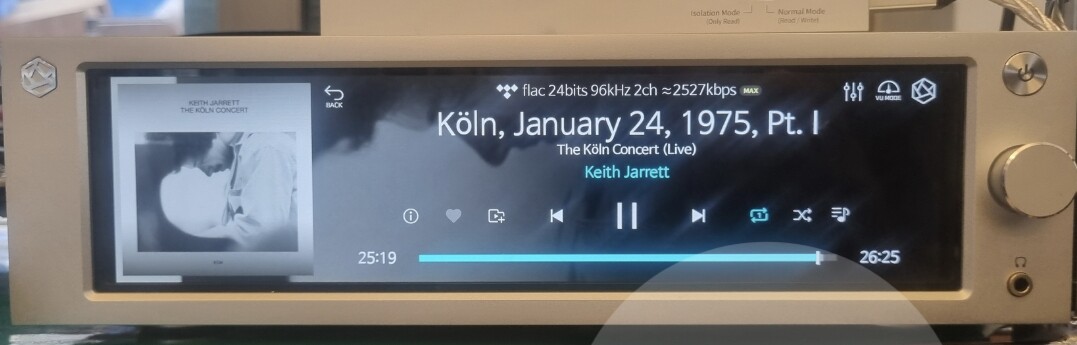
@ivanhaentjens
Please share the Rose id of the RS250A you are using.
We will comment after confirming the reproduction.
thank you.

@ivanhaentjens
We played the audio source in the photo below on repeat for over 4 hours, and no issues occurred. If an issue occurs, could you please send me a video clip to the email address below?
shim1691@citech.kr
music_test_0112

Dear sir of madam,

Let me first say I am really impressed by the outstanding quality of your technical helpdesk.

I see you are using Tidal, I use Qobuz. I don’t know if it matters.

My wired ethernet has 400Mbps connection speed.

After the plackback issues the Rose became very unstable : crashes, unexpected reboots and so on.

So last night I decided to reset to factory settings and avoid to play very long tracks.

Everything works fine now, now weird behavior anymore.

However I’m a bit afraid of trying to play that track again, and having to reset to factory settings and start all over again.

Is it possible a playback issue introduces extra problems regarding the normal working of the Rose?

Is noticed there is a debugging option… would that help you?

Thanks a million,

Ivan

ROSE id: 0E6743

Dear Rose_love,

Would you please be so kind, to share your settings (gapless on/off, …) and the router settings (MTU; ipv6 on/off, …) you used?

I changed my router settings and ethernet settings on the Rose, so it has a fixed IP address now, but to no avail. This time the track stopped at 11 minutes, the screen went blank and the Rose restarted.

The Rose became again unstable so I did a new factory reset.

FYI : meanwhile I have bought the Koln Concert track at the Qubuz store and it plays fine from an external USB drive, however.

@ivanhaentjens

After remotely checking your device, we did not find any specific issues in the logs we collected.

Based on our analysis, the symptoms appear to be caused by a faulty CPU board in your RS250A.

Please contact the distributor in the country where you purchased the RS250A and request a repair service.
You can find the list of distributors for each country at the link below:
distributor.roseaudio.kr

Thank you. I will contact the distributor (in The Netherlands). I assume it will be sent back to the factory for repair?

@ivanhaentjens

It will not be sent to the factory.
The distributor in the Netherlands will handle the repair directly.

Please contact them, and they will kindly explain the repair process to you.