Dear
Is it possible to turn off the screen from the device? I know you can from the app.
Thanks in advance for your answer.
And overall very good work.
Thank you

Dear
Is it possible to turn off the screen from the device? I know you can from the app.
Thanks in advance for your answer.
And overall very good work.
Thank you
Which device?
On the RS130 if you press and hold the button on top farthest right for a few seconds it give you choices to turn off, etc. and one of the choices is LCD Off or similar.
no you can’t do it from the hardware (device) on 150b
I can do it. It works.
Through the app Rose Connect or Rose One you can turn the RS151’s LCD off and then turn it back on.
I appreciate that option since I prefer the LCD off when listening to a whole album from the first song to the last: I can focus on the listening pleasure without being distracted by the image on the lcd.
When I already know to start an entire album listening and I’ve just turned my hi-fi system on, it would be much easier having the possibility, after having selected the play button on the lcd, to turn the lcd off directly on the lcd without the need of using the app.
What about adding an LCD OFF icon just before the VU MODE icon?
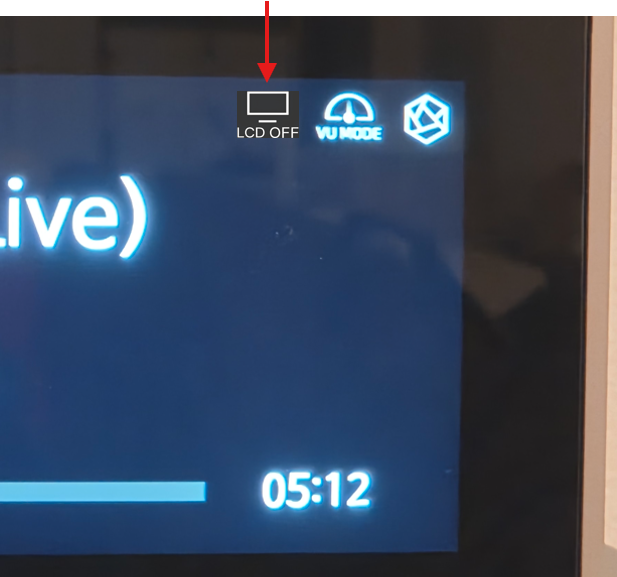
To turn the lcd back on will be possible through the app or through the phisical rightmost button on the RS151 top. It works already: pressing it once, the lcd (previously turned off) goes back on.
I see you can do the same by pressing the righmost button for a few seconds but only if your device has physical buttons on the top (RS151 & RS130 have). Having this new icon on the screen would allow the lcd to be turned off for hw devices without physical “power on/off” button.
I will forward your suggestion to our software team.
After reviewing it, we will try to implement it if possible.
Adding this feature itself is not technically difficult. However, from a UX perspective, it is not appropriate for this function to be placed on the playback detail screen. If it were placed there, the LCD could unintentionally turn off when a user accidentally controls it.
In addition, this function is already available by long-pressing the RC and the power button. Once the LCD is turned off, music can still be controlled through the RoseConnect app.
For these reasons, we have decided to keep the current design as it is.
A request, although easy to implement, is always mission impossible  .
.
Adding this feature itself is not technically difficult.
However, from a UX perspective, it is not appropriate for this function to be placed on the playback detail screen.
Of course that’s not my point of view.
We apologize that your request could not be implemented.
After internal discussion, we have decided to maintain the current design as it is.