
@Christoast
Please provide the ROSE ID from Device Settings > System Information so we can check.
Rose ID: OD3111 for Early Access 5.12
@Christoast
Is it correct that your device’s Rose ID is 0D3111, starting with a number ‘0’ instead of a letter ‘O’?
If you click “Use Official Version” and download it, version 5.9 should be downloaded. However, is it correct that version 5.11 was downloaded even though you downloaded the Official version?
That’s right, I went from the official version 5.9 to Early Access version 5.12.
Then, when I switched back to the official version, version 5.11 was updated.
Currently, I’m back on Early Access 5.12; it’s the only version that allows me to access Tidal.
1 Like
Hallo
i have a RS520 and I can’t sea the firmware update.
My early Version it’s 5.10.
Can somebody help me?
Greats from Switzerland
Remo
Hi Remo,
Before you update — I’d hold off for now if I were you. I have an RS520 too, and after updating to the latest [Early Access] v5.12.04, I ran into a serious problem: the device kept asking to update the MCU, and every time I confirmed, it rebooted and asked again — an endless loop. I had to roll back to the stable firmware (5.9.0.9).
One more important thing: if you update and run into problems, you most likely won’t be able to roll back to your current Early Access 5.10 — as far as I understand, you can only go back to the official stable version, not to a previous EA build. So you’d lose your current version either way.
I’ve reported the issue to Rose and they’re looking into it, but there’s no fix yet. So unless you specifically need something from the new version, I’d recommend staying where you are until Rose confirms it’s resolved.
You can follow my report here: RS520: MCU update loop after [Early Access] v5.12.04
@Geka4epist
Many thanks for the help, I also reported it to Rose and the answer is.
We apologize for any confusion this may have caused.
Following the release of the Early Access (E/A) version, an issue was reported where the Rose ID was not visible for certain users. Since there is a possibility that this issue could affect other users as well, we have temporarily suspended the update while we analyze the root cause.
We plan to redeploy the update around tomorrow and will provide another announcement as soon as it is released.
Thank you for your patience.
2 Likes
@Christoast
Thank you for your help. Thanks to you, I think we’ve found the root cause. A new EA version is expected to be released this week, and I believe this version won’t have any issues.
2 Likes
Glad I could help!
Unfortunately, I haven’t received any updates from the Rose team regarding my specific issue yet. But from what I can see, it looks like we’re all dealing with the same root problem here — the bug with the incorrect Rose ID in the new firmware. And as I understand it, that’s also what causes the MCU update issue.
Hopefully the new EA version they mentioned will fix all of this. Fingers crossed!
Hi Rose_love,
I’d like to request a small but important addition to the upcoming EA release: please add the Israel time zone (Jerusalem / Tel Aviv, IST UTC+2 / IDT UTC+3 with daylight saving) to the firmware.
Currently there is no option to select Israel’s time zone in the device settings, which means the clock(and the weather) cannot be set correctly for users in Israel. As a workaround I currently have to select a different city in the same offset - Athens in my case, but this doesn’t handle our daylight saving transitions properly.
This should be a simple addition, and it would be much appreciated by Rose owners in Israel. Thank you!
Thank you for your suggestion.
The request has already been forwarded to our software development team for review. From our initial assessment, this appears to be something that could potentially be addressed through a software update.
We will continue to monitor the progress internally, and as soon as we receive any updates or confirmation that the requested feature has been implemented, we will be happy to let you know.
Thank you for your valuable feedback and for helping us improve HiFi ROSE.
1 Like
I would like to know how the new software update affects or impacts the PRE-OUT LEVEL SETTINGS and the VOLUME CONTROL. I currently have it configured as shown in the image.
Additionally, I’d like to know whether I’ll still be able to keep this configuration exactly as shown in the image.till be able to keep this configuration exactly as shown in the image.
I’m also sharing screenshots of my current software version and my current audio output configuration for reference.
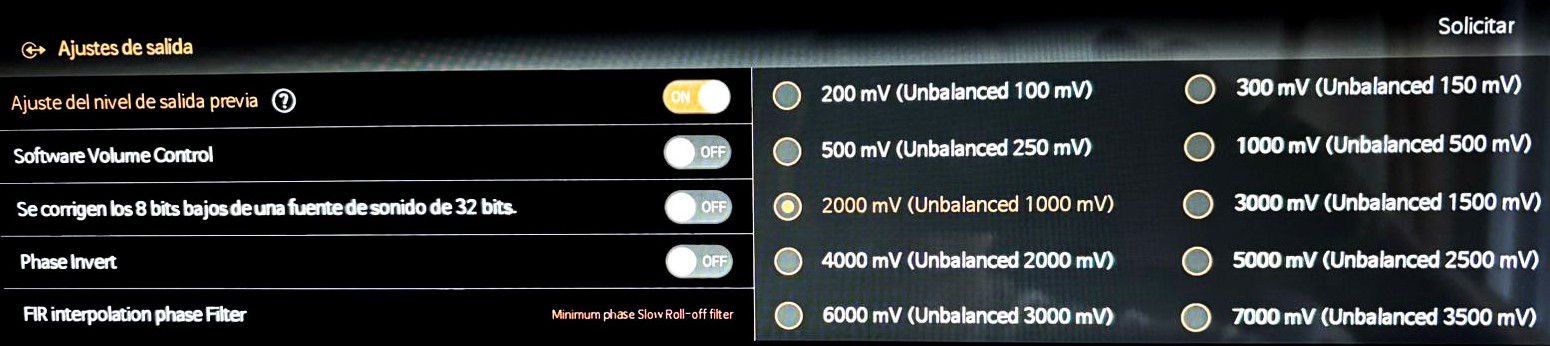
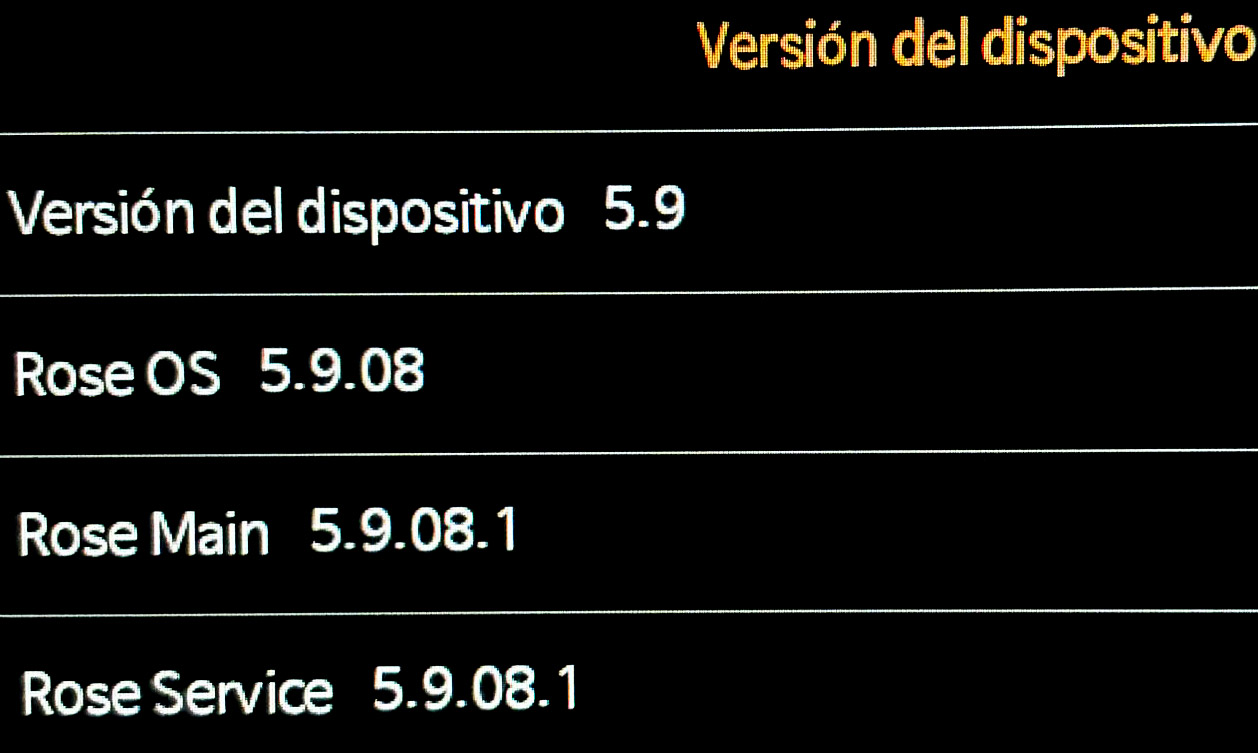
Regarding the latest software update, the release notes originally included the item “Added Maximum Volume setting and Startup Volume setting” for the PRE-OUT LEVEL settings and volume control.
However, during the implementation of these features, several issues were identified. As a result, these features were not included in the final software update.
The release notes should have been updated to remove this item before publication, but unfortunately it remained listed by mistake. I have now removed the incorrect information from the Software Update Notice.
Additionally, based on the screenshot you shared, it appears that your ROSE device is currently running the Official version, not the Early Access (EA) version.
The update you are referring to is available only in the Early Access (EA) version.
To switch from the Official version to the Early Access version, please follow the steps below:
Settings → System Information → Use Early Access Version → Try It