In this update, did they fix the interface problem for playing SACD ISOs?
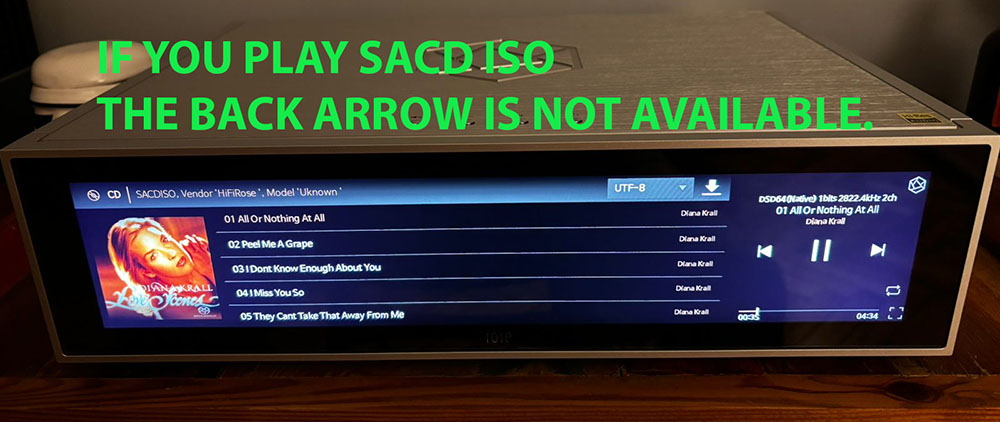

In this update, did they fix the interface problem for playing SACD ISOs?
Successfully upgraded, but may I ask when it will be possible to support embedded QQ Music platform? If we want to do well in the huge market of China, the support of local music platforms is very important!
Hello,
The problem with the SSD disappearing is not caused by the update.
Today, I unplugged the RS151 and when I plugged it back in, the SSD was no longer visible.
I disconnected it again and it became visible once more.
Is this a problem with the device or a bug?
I was loaned an RS151 before purchasing it, so I’m not sure if it’s the device that has a problem.
Thank you.
Hi,
On the CD playback screen, the back point is the Home screen.
Both the Home button and the Back button lead to the Home screen.
Also, when playing an ISO file from Rose Connect, pressing Home will take you back to the CD playback screen afterward.
Therefore, on the screen you mentioned, a Back button is not necessary.
However, when playing an ISO file directly on the Rose device through Music → ISO, the back point is not the Home screen but the Music screen, so the Back button will be displayed.
Please keep this in mind when using the device.
Thank you.
@Razmote
In our internal testing, the SSD disconnection issue did not occur even after more than 20 power cycles. Could you tell me how often this occurs?
Hello Rose_love,
When I insert the SSD into the RS151, it is recognized.
Then, when I put the device into standby mode and turn it back on, the SSD is recognized.
However, if I turn off the RS151, unplug the power cable, or restart it, the SSD is no longer recognized when it starts up.
The only solution is to turn off the RS151, remove the SSD, and turn it back on.
The SSD is then recognized.
If I put the SSD in a storage bay connected to a PC, it is recognized every time.
I tried formatting the drive on the RS151 or the PC, and it’s the same.
The SSD drive is a 1TB PNY.
There is a similar case with an RS250 here:
SSD not recognized - HiFi ROSE
This RS151 is on loan before purchase, but I cannot buy this device if there is a problem.
Thank you for your response.
It is recommended to use the Samsung EVO870 SSD.
Are you having any problems with the latest firmware on the RS151?
Today I updated my RS 151 from version 05 to 08. The update went quickly and smoothly. I haven’t noticed any issues after the latest update. My friends who also have RS 151s updated their RS 151s about a week ago, but they had the 07 software, and none of them have had any issues since the update. Two of them claim the sound is better with the latest update.
@Cougar2025
Thank you for your comment. If you experience any inconvenience while using the product, please feel free to leave a comment and I will review it and respond.
I will add to my post that the lack of anomalies concerns using the player only for streaming, none of us uses the player to listen to music from files, so I have no knowledge of whether there are problems when using a disk connected to Rose RS 151 and all aspects that relate to listening to music in this way.
@burki
We need support from Roon, but I’ve contacted them several times, but haven’t received a response. I apologize, but I’ll reply as soon as I have more information.
Thanks for your response. Has the RS151 here the same problem like the RS451?
@burki
Additionally, even if the Roon settings do not allow standby mode, you can set automatic standby mode in minutes on Rose (RS151, RS451) by going to Settings>Systam Settings>Automatic standby mode setting>Manual Input
On behalf of many people, I once again request that you update your system or application so that the track currently playing on a given album is, for example, bolded, or displayed in a different color, or something else. The goal is to make it immediately visible in the track list for the album being played.
This doesn’t require extraordinary skill, just a lack of will on the part of the people responsible for this at Rose. Practically everyone has this option, yet for many years you haven’t been able to update it so that the track being presented is immediately visible to the listener.
In the latest sequence, Tidal does not show new albums, how to use the Tidal system application on Rose
@Cougar2025
This is information provided by Tidal, but there is a problem with the data provided, so we are contacting Tidal.
It seems to be the same for other devices (WiiM Pro).