
I have updated today the Rose One app to the 1.0.18.1 versión in my Android 11 tablet and, when opening it, the page appears for a second and then disappears. A message “Rose One is still not working” is shown sometimes. Disinstalling and installing it again is useless.
I have updated in my Android 15 phone to the 1.0.18.1 versión and it works. In the information of the app in Google Play the minimum required software is Android 7.0. Which is the real one?
I’ve tried to download the Rose One app to my iBasso DX180 which is running android. I can use Rose Connect but not Rose One.
Rose One was working with my Android 11 tablet until today but certain operations were terribly slow: To erase the queue or to go to album. But with the 1.0.18.1 version it does not work at all. No problem with Rose Connect which is perfect for me since I only use my RS 150B for streaming from Qobuz.
1 Like
The same here… disappears with error, stops working, appears again.
Android message, This application keeps stopping
Version 1.0.18.1 of Rose One has introduced more problems and, for me, it is unusable on my iPhone 16/ RS520.
-
By default I have always used “ Empty Queue and Play from Here” from the settings menu when streaming via Qobuz, Tidal. It has worked without problem until last Friday. Now, after first starting the Rose One App and starting a track, the queue is not emptied and the new queue does not appear as it should.
Result ? Just one track is played and then it stops playing.
When I stop the track and repeat the process it then plays as it should.
This problem is common to both Tidal and Qobuz. -
The app is slow and there are constant freezes.
Other problems , some of which have been outstanding for weeks and which I’ve reported to Rose via email are-
-
Almost impossible to play a playlist containing more than 100 tracks in Tidsl, especially when randomly selecting a track from the list rather than playing from the beginnng. Rose has recognised the problem but still no fix.
-
The CD function on the Rose One app does not work as it should. I can load the CD as normal and it starts playing fine. Tracks and album cover etc. are visible on Rose 520 display.
However, when I click “CD” on One it does not display the tracks. I simply get a message saying the list is empty !! -
In general, scrolling is not smooth and can flicker. It can sometimes cause the app to freeze.
I am not trying to decry the Rose One project. Far from it but there are some basics that need to be addressed urgently before customers embrace the new app in favour of Rose Connect Premium, which is working just fine on my RS520 (Qobuz, Tidal, CD, Rose Radio, RoseTube).
1 Like
I have been checking Rose One in version 1.0.18.1 in my Android 15 phone and it works more or less well with Qobuz. The queue is emptied and the new one appears when pressing “Empty Queue and Play from Here”. It is a bit slow but much faster than the previous version in my Android 11 tablet, where the new one does not work at all.
@ Alberto
This was the reply I received on 7 April from Rose when I highlighted the issue of slow response on Rose One , as well as an issue of not bring able to clearly see the last playlist or album when scrolling to the end of the respective lists -
“1. Due to hardware limitations on devices equipped with low-performance CPUs, such as the Galaxy Tab A7 Lite, we are unable to further improve stability and performance at this time.
For now, we will continue to develop and support ROSE CONNECT PREMIUM alongside ROSE ONE. However, once performance is improved on lower-end CPU devices, we plan to encourage users to use the ROSE ONE app.
In simple terms, the performance of ROSE ONE may vary depending on the CPU performance of your phone or tablet.”
My iPhone 16 is less than two years old.
Rose subsequently confirmed that it would be compatible with Rose One.
Nevertheless there are still problems e.g. switching from Qobuz to Rose Radio this morning caused the screen to freeze but the radio still played !
When selecting “ empty queue and play from here” on your Android 15, do you select from the three dots to the right of the track or from the Settings > Device Settings> Audio Settings> Music Playback Options menu ?
I have always used the Settings menu ( one activation was good for 3 years ! ).
@ Martini
I was using the three dots menu for selecting “empty the queue and play from here” but I have tried with Settings… and it works fine too. I did not know this method and I will use it since almost always I select the “empty the queue and play from here” option. If, sometimes, I prefer another possibilty, I will use the three dots menu to choose it.
[Android message, This application keeps stopping - works on one Samsung Tablet but not the other one.
Using Android 15 and Android 11 which are well within the specifications for the app.
@colin
Are you unable to find it on Google Play?
Please provide the exact tablet model so we can check.
The app was downloaded from Google Play.
Samsung Galaxy Tab S4 - SM-T835
It is running Android 10
No answer from Rose as usual. Which is the minimum required software for version 1.0.18.1 of Rose One to work?
We have confirmed that the SM-T835 model operates normally, but it seems you are experiencing some issues during use. Is that correct?
Could you please provide photos or a more detailed description of the problem? You may also send a video to the email address below: shim1691@citech.kr

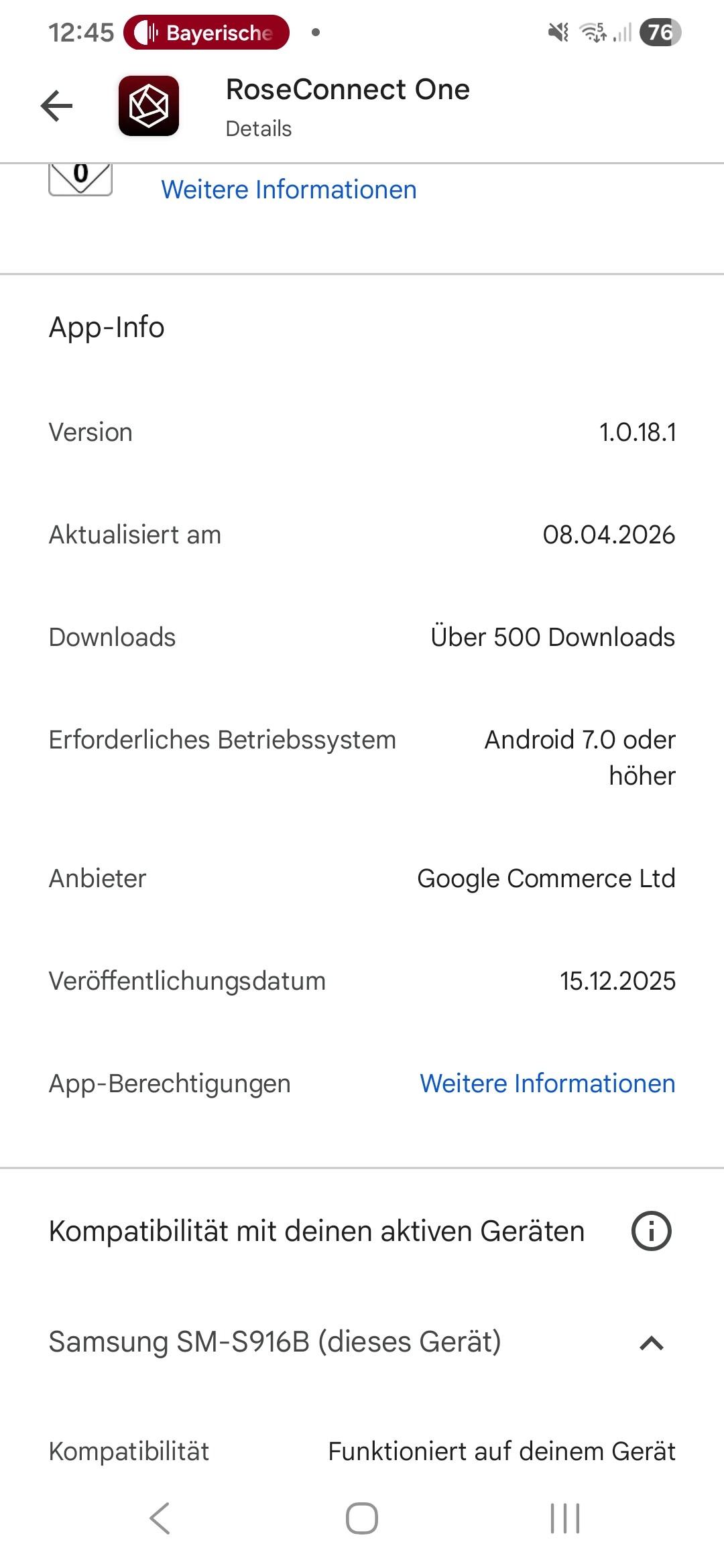
Yes, currently ROSE ONE can only be used on devices running Android 10.0 or higher.
However, it is currently listed in the Play Store as requiring Android 7.0 or higher.
I will pass this information on to the software team and request that it be corrected as soon as possible.
Since the introduction of version 1.0.18.1 the function “ Empty Queue and Play From Here”, when activated via the “Setting” menu, does not function. Version 1.0.19.1 has not provided a solution.
The queue is not emptied nor is a new one created. See screen shot
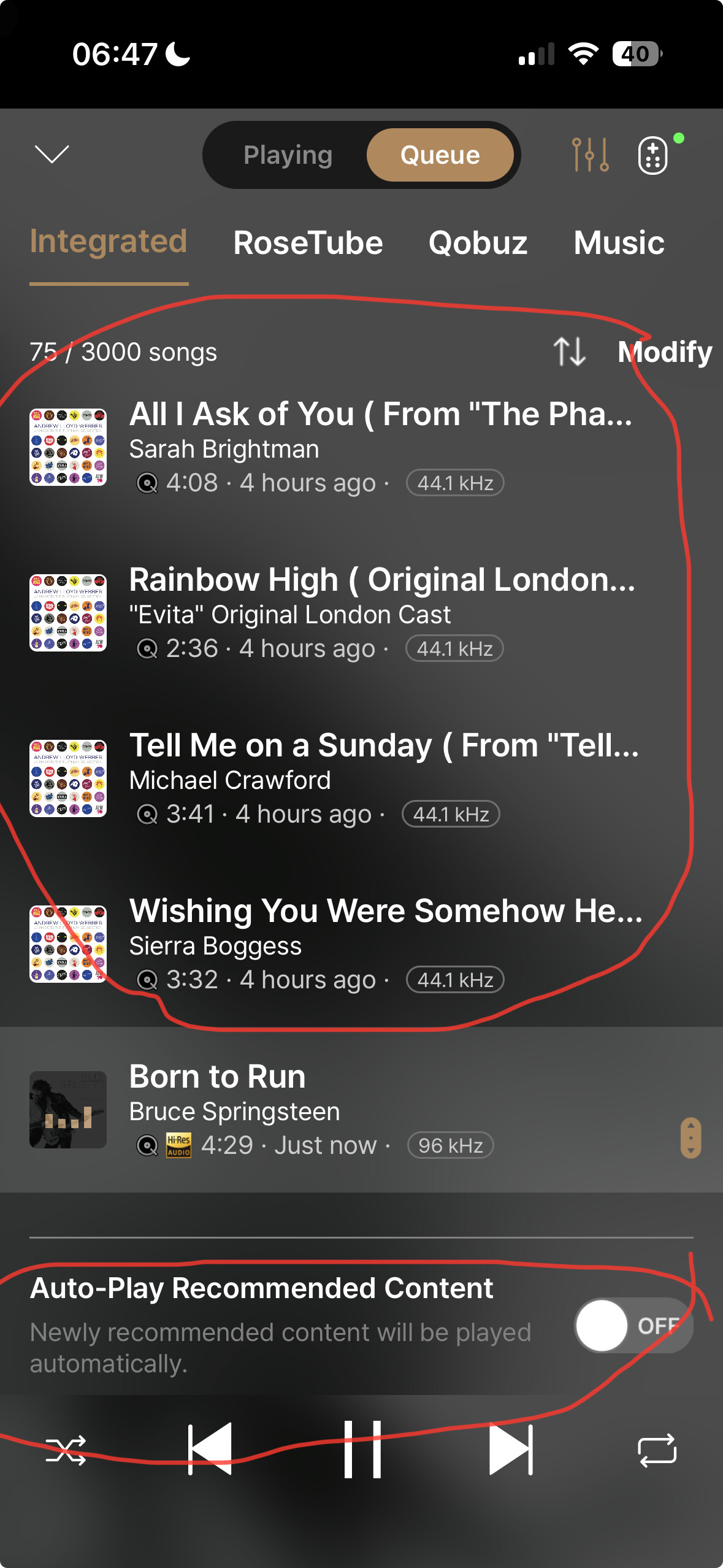
The function works fine when activated via three dots but I why must I do that every time I play a different track ?
When working properly via the Setting menu, I only have to activate it once and then I can forget about it.
I have already forwarded this issue to our software team.
Additionally, I would appreciate it if you could confirm a few things:
- When you select “Empty Queue” or “Play from Here” as the playback option on the ROSE device and then choose a track in the ROSEONE app, does it not play according to that option?
- You mentioned that when it works properly via the Settings menu, you only need to activate it once and then you can forget about it. Does this issue occur all the time, or only occasionally?
@Martini
As shown in the test video below, the function works correctly when you select Setting > Audio Settings > Music Playback Options > "Empty the queue and play from here."
Please restart your device and follow the steps in the video to check it again.
Test Video: https://drive.google.com/file/d/1CXXICBLelJAR4L7WHASijEf5yfBDf7ly/view?usp=sharing