
Sometimes devices need a specific order to find the USB DAC. Some devices are found quickly, some only after a Reboot of the Rose Device while the DAC is ON and already connected.
And there are DAC, that only works with specific drivers. The OS of the Rose would expect a DAC that can be used without drivers.
1 Like
I am in the process of choosing either RS130 or Lumin U2. I have a large library of DSD materials ranging from 64 to 256 (only 1 512) stored on an external SSD HD. Based your screenshot, you don’t seem to have an issue with outputting DSD natively via USB with RS130. I like to go with RS130 but playing back DSD natively is important to me.
Is my setup similar to yours? People experiencing the issue with lack of DSD native output via USB, are they caused by Roon? I am not using Roon.
My DDC and DAC are Denafrips Gaia and Terminator 2. My current streamer is Auralic Aries G1 and is connected to Gaia using USB which then connects to the DAC using i2s.
Any insights you can share are greatly appreciated.
Many thanks,
Tom
Yes indeed : No problem playing native DSD through my MSB Diamond V DAC, using RS130 SFP USB output connected with optical fiber first to ROSE RSA720 USB hub, then to MSB’s USB input with a short standard USB câble !
I guess you could connect your RS130 via USB the same way to your GAIA DDC, with a better SQ than using i2S directly…
1 Like
Thanks for the quick reply. If you connect directly to the DAC using the “USB-DAC” USB port at the back of RS130, I wonder if it is still native through this port. If not, then the native output enabler is the connection to the DAC via the RSA720 using the USB 3.0 Fibre port at the back of RS130.
I really want to choose RS130 but want to be 100% sure.
Thanks once again.
Yes, before I got the RSA720 hub, I was also native to this usb-audio port with my Terminator 
(i2s too!)
1 Like
@zekor I was just describing my setup and I’m happy @musiq can testify that native DSD can be output from the RS130 to your Terminator, directly by USB.
By the way the RSA720 is only a USB HUB : it has no DSP to modify the data format, so if native DSD can be played, it is coming for sure from the RS130.
1 Like
Many thanks for sharing your valuable insight. Much appreciated.
Thank you very much. I am now feeling much more at ease with RS130’s native DSD output capability. I guess a follow up question would be the improvement by adding RSA720. What’s your experience?
Kind regards,
Tom
Like others have expressed it on this forum, the RSA720 allows a connection with optical fiber, with an immediate noticeable sound quality improvement, probably partly thanks to a full galvanic isolation…
The next step could be (like in my setup) to add a better performance external clock to your RS130 !
1 Like
Yes! An external clock like the lhy ock-2s definitely results in a noticeable improvement of sound quality. You won’t regret this!
I am unable to play Native DSD through USB from my RS130 to a Rockna Wavedream DAC. The output from the DAC indicates it has been converted to PCM. Just wanted to add this for reference.
Please check the table below.
This is about DSD mode settings. If you connected RS130 and Rockna Wavedream DAC with USB, Native DSD setting will make sure that the sound source played by RS130 supports up to DSD 512 according to external DAC specifications.
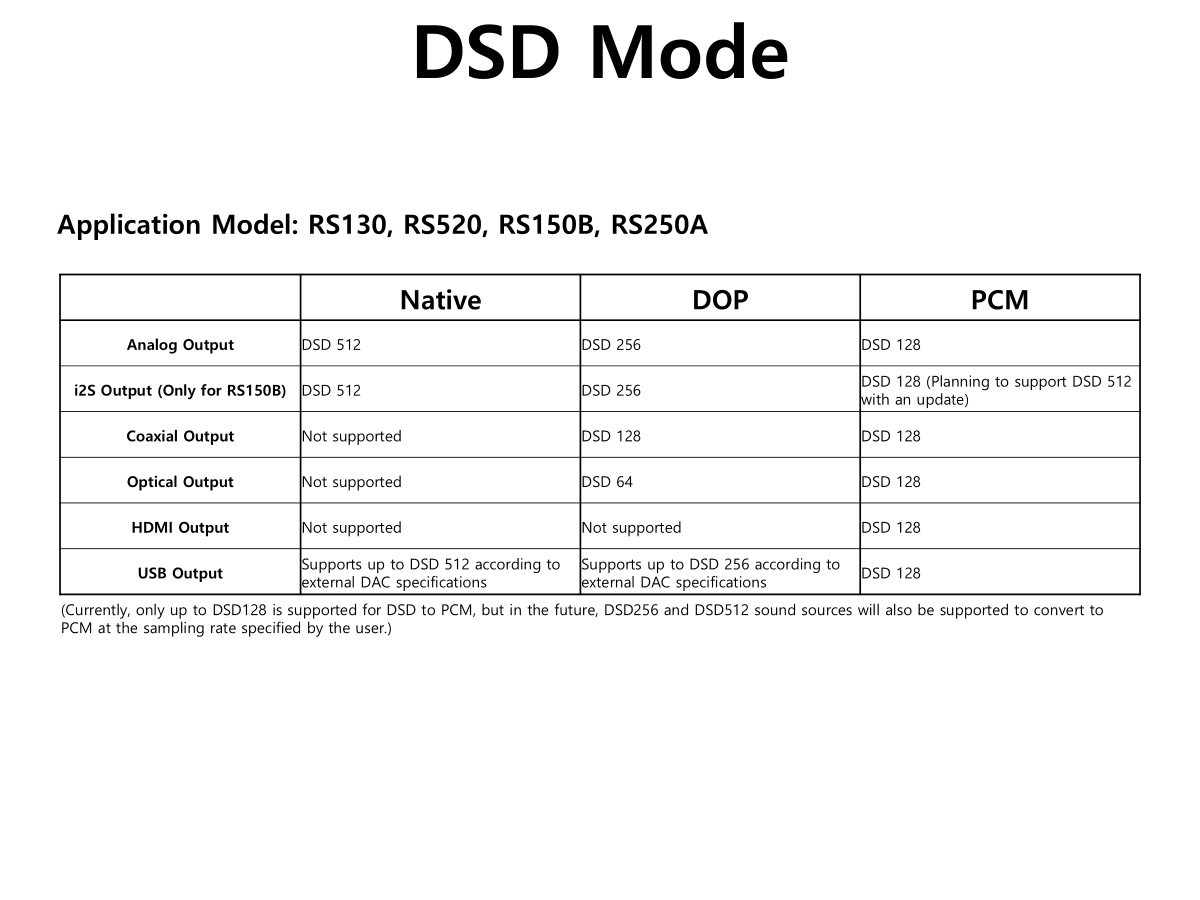
Please check your DAC specifications
As I have written, Native DSD is not possible with a Rockna Wavedream DAC on USB. It is converted to PCM.
DoP is possible on USB without issue.
Also, as I have written before, Native DSD through I2S output to Rockna Wavedream DAC produces sound interference in the forms of “bump” noises, similar to a record drop on a turntable. In other posts on this issue, you have referenced a blog post with respect to Rockna Wavelight DAC (an inferior product compared to Wavedream). In that blog, it was posted that Rockna had said the noise interference problem was due to the RS130, as no issues were found with other source products from different manufacturers.
As a result of checking your DAC, it is confirmed that your DAC does not support DSD when connected to a Linux-based device via USB.
Since Rose devices are all Linux-based products, when we checked the Linux kernel built into the RS130, we confirmed that it does not support DSD when your DAC is connected via USB.
Unless this is fixed on the Linux side, it is difficult for us to help.
If you look at the link below, there are users who are having similar problems as you.
If you want to listen to DSD sound as is, set the DSD mode to DOP on RS130.
As you can see from the table below, if you set the DSD mode to DOP in RS130, it supports up to DSD 256 according to external DAC specifications.
The error message above shows that if your DAC is set to DOP, it only supports up to DSD128 and an error message appears when playing DSD256
Additionally, if you look at the link below, you can see that your DAC only supports up to DSD128 when set to DOP in DSD mode.
1 Like
@ZABOKS Today I hooked up the RSA720 to the RS130 using the supplied SFP cable with my SSD HD (USB 3 port) and DAC (Denafrips Gaia/Terminator 2) (USB 2 port) connected to RSA720. Unfortunately the DAC is not recognised by the hub. Kind of not surprised as there are quite a few reporting in this community but was hoping it might work. So a bit disappointed.
At moment, am connecting the DAC directly to RS130. A couple of questions if you could be able to advise on:
- Do you have RSA720? And is a firmware update needed in order for my DAC to be recognised?
- Would there be a benefit in connecting my DAC directly to RSA720 over connected to RS130?
PS: I have emailed eunseong96@citech.kr for a firmware update, just in case it is needed.
Many thanks for your time to read this and appreciated any advice you can give.
Kind regards,
Tim
- Yes I have but I was lucky not to have been forced to update it : it was always working with my MSB DAC… so I don’t know and hope @ROSEHAN will answer to you.
- As I said before, the RSA720’s main benefit is to fully galvanically isolate the DAC (connected to it by USB) from the RS130, which proved to improve the SQ for me and numerous users.
1 Like
@zekor
I too had to change the firmware on the RSA720 to get my Terminator recognised!
But it’s worth it because the sound is really better with this fibre isolation. 
1 Like
Many thanks for sharing the information. I have emailed and hope to received the firmware soon.
@musiq I managed to update the firmware on Port 1 according to the Excel spreadsheet instruction but failed to update Port 2. Anyway, I went ahead to see if my DAC can be recognised by RS130 using RSA720. Unfortunately it is still not recognised. Furthermore, the firmware upgrade seems to have broken Port 2 as my SSD HD is no longer showing up as the music storage on RS130. In fact, there seems to be no power coming to the SSD. It was ok before the Port 1 firmware upgrade.
@ROSEHAN I have emailed you the above. Do you have any suggestions for me to try? Otherwise RSA7200 is going back to the retailer.
Kind regards,
Tom