
Frankly, we’re not being helped 
@ROSEHAN ; He’s referring to the pre-installed cache SSD—the one your factory technicians install during the unit’s build process—not an aftermarket drive added by the customer.
As the first line of customer support, this is a fundamental configuration detail you should immediately recognize and communicate clearly. The guidance provided so far is incomplete, misdirected, and it’s creating avoidable confusion.
At a minimum, you should be able to confirm the RS130’s standard build configuration upfront—especially given that this product has been on the market since 2023—or escalate this promptly to someone who can. That baseline understanding is required before you can properly troubleshoot the actual question being asked.
If you’re not equipped to handle this, then please route this to someone who is—without further delay.
I am still curious, does the unit work at all? Does it have skips in the songs? How was the unit behaving when you discovered the cache was damaged but before you replaced it with the one that needs formatted?
Patricia was too busy listening to her SFP modules and sonic differences between fiber brands to actually notice if her little toy was working or not.
@Eleven
Hello Eleven,
I’ve gotten into the habit of clearing the cache once a week. I’ve noticed that doing so keeps the sound quality consistent. I mention this because it seems to me that the SQ’s quality tends to degrade with use of the RS130; in fact, I even perform factory resets regularly. Last week, I got error messages 01 and 00 in the cache section when I tried to clear it.
@PatriceP
I apologize for the delayed response.
The “00 Error” shown in the photo occurs when the NVMe is not properly connected, as illustrated in the image below. For testing purposes, if you remove the NVMe and clear the cache, the 00 Error will be triggered.
It is possible that the device is failing to recognize the drive due to damage to the connector or another underlying issue.
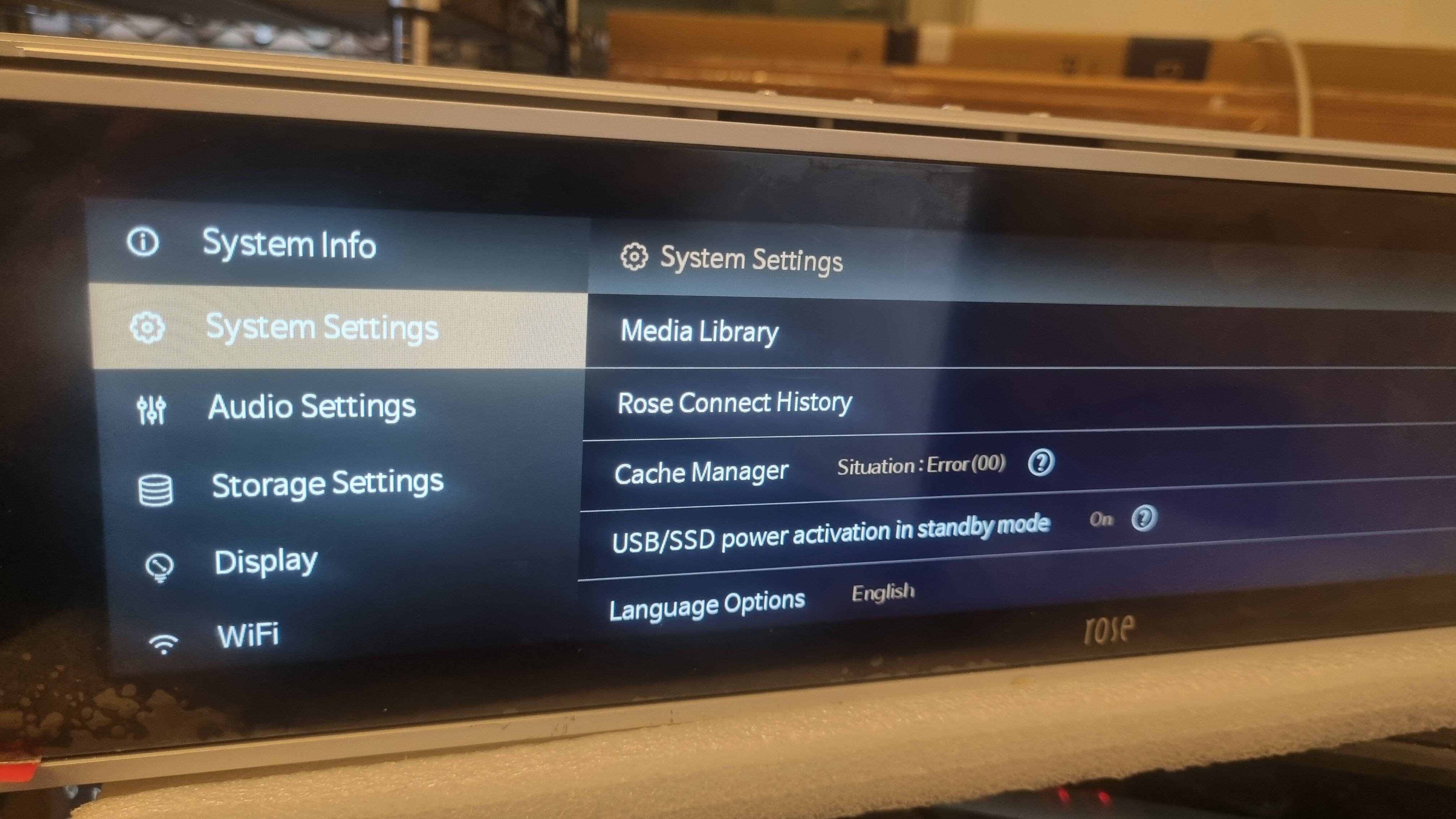
Greetings! But if everything is absolutely ok from the physical connection point of view, would the RS130 automatically format this M2 caching SSD, or should it be formatted using a PC before connecting it to the rose? What format should be used for M2 caching SSD (FAT, NTSC, etc.)? Thanks.
Thanks for the reply, but are you sure you’re talking about caching SSD (M2)?
@ROSEHAN Hello, could you please check with your developers if the SSD cache can be used also when the RS130 is used as a Roon endopoint? It would be nice to have the cache memory playback (from SSD) also for Roon operations…
Roon by design uses very small buffers to allow for synchronization between zones, so unlikely.
If you are getting dropouts while playing from Roon there’s something wrong with the network (well, or 130, or your Roon server, but most likely the network).
I have no issues or dropouts. Actually everything is super smooth while using Roon on the RS130.
I thought the SSD caching was implemented/offered to bring audio improvements. Isn’t the case?
No. It can’t. Cache is there so when you play something that’s traveling over the public internet, with unpredictable performance (so basically, Tidal, Qobuz, and similar streaming services)m, it will try to buffer the data to the cache, as fast as it can be served, so it can be played back properly even if there are slowdowns or interruptions in your internet connection. DAC does not care where that data came from, SSD or network, as long as it gets it in time.
Roon sits on your own private network, so those should not be an issue. Roon server maintains its own buffer when pulling from streaming services (although many people do complain that it is not big enough) but this is not something Rose could do anything about.
2 Likes
Hello @Rose_love .
A quick update regarding the NVMe SSD cache issue: the WD SN740 SSD was indeed defective. The one I used as a replacement was a Patriot P400 Lite, which had the advantage of using half the power, but apparently it’s not compatible with the RS130. So I bought another SSD, a Kingston 500GB Gen 4, and everything is working perfectly again.
For your information, you shouldn’t format it or create a partition.
This information is excellent! Thank you. I think I’ll also change that M2 SSD, because it only works when it wants to, that is, not always. Congratulations on managing to fix it. Please tell me the exact model of Kingston you installed.
@scoro2000
Here is the SSD model used: Kingston NV3 NVMe PCIe 4.0 SSD 500GB M.2 2280-SNV3S/500G.
Since this model is twice as fast (read and write speeds), I added a passive heatsink like this one:
Any other heat sink of this type will do the job, this one has a fairly large cooling surface.
Finally, I can confirm that the cache doesn’t work with Roon, but it does work with UPnP. I use the JCAT app instead of the awful Rose Connect, and everything is simpler, faster, and more stable, and the cache seems to work (you can see it on the progress bar on the RS130 screen).
1 Like
Thank you very much. I appreciate you sharing your experience with us. You are very kind. All the best!
1 Like
Hello! It’s been a while since you changed the M2 SSD. Please tell me if there have been any problems with that Kingston in the meantime, that is, if it has worked perfectly, without any errors since then. Thank you.