Which Streamer/Transport has the best software

Tyler,

I agree. I haven’t tried them all but so far, Roon has the best software by far. It’s more comprehensive than just combining various other music services into one or making music libraries easier to search. They actually add interesting content about the history and background of the music you like. Also, they (unlike RoseConnect) don’t force unwanted music content on you. Still, I’m concerned about Harmon’s acquisition. They might change course. We’ll see.
That said, I still prefer HiFi Rose for its unparalleled ability to combine high quality video with music. Nobody else comes close to those combined capabilities.

StandardModel

I have ROON too, that’s complete another beast, scan times on ROON are negible. But ROSE has a enormous difference between (slow) scan times for the first scan (3h for 80k files) and (super slow) rescan (10 times longer, around 30h for 80k files). But they announce a massive improvement for scan/rescan until end of the year.

i have a roon nucleus+ and an RS130 with fiber sfp. i listen to both. there is zero difference in sound quality between the two. they are fed into a Chord MScaler and DAVE dac, then to an Ayre AX-5 Twenty and then to Perlisten s5T speakers. digital cables are kimber d60 and all other cables are cardas clear or clear beyond. the rose doesnt sound better AND its buggy. roon ALWAYS plays flawlessly.

IMHO Sonos has the best user experience. By far the worst is BluOS / Bluesound, loads of bugs and terrible support. Naim is oke and comparable to Rose.

J’ai un Rose RS250A et j’avais déjà un Cocktail Audio X50D. Pour un besoin de transport seul sans DAC il n’y a pas photo, après 1 an de tatonnement environ le X50D a maintenant un logiciel digne de ce nom pour toutes les fonctions dont j’ai besoin. Gestion et traitement de la base de données notamment (j’ai 2,4 To de musique sur les disques). En outre tout est intégré 2 DDur intégré amovibles avec fonctionnement en RAID, lecteur de CD intégré. Aucun autre équipement à ma connaissance ne rassemble toutes ces fonction à ce prix (quand je l’ai acheté moins de 2000 €).
Je ne comprends pas pourquoi ce produit n’est pas plus répandu.
J’espère qu’un jour le RS250A atteindra ce niveau de logiciel.

Rose’'s Queue function pulls in lists of songs "playlists"from other user subscribed services such as iTunes (Apple Music), etc. I have at least fifty playlists in Apple Music. Which one(s) does Queue import?.

StandardModel

When I go into the Qobuz section of RoseConnect I see all of my Qobuz playlists. I don’t use iTunes or any other service so I don’t know about those.
But I don’t see this as having anything to do with the Queue in RoseConnect.

Sebrof,

OK, then I misunderstand the composition of the Queue. I thought it was the aggregate of the playlist(s) in each of the services identified by the tiny icons in a vertical list next to (on the left hand side) of the Queue, ir iTunes, etc… If not that then what are the constituents of Queue. In other words, of what or how is the Queue list comprised? How does one add to or delete items in the Queue?

StandardModel

To clarify, the queue is simply a list of songs that you have selected to be played. Queue is the songs waiting in the queue (or we might say “waiting in line” here in the US). There are several ways to get songs into the queue.
The first pic is a partial shot of one of my Qobuz playlists (Good Tunes).

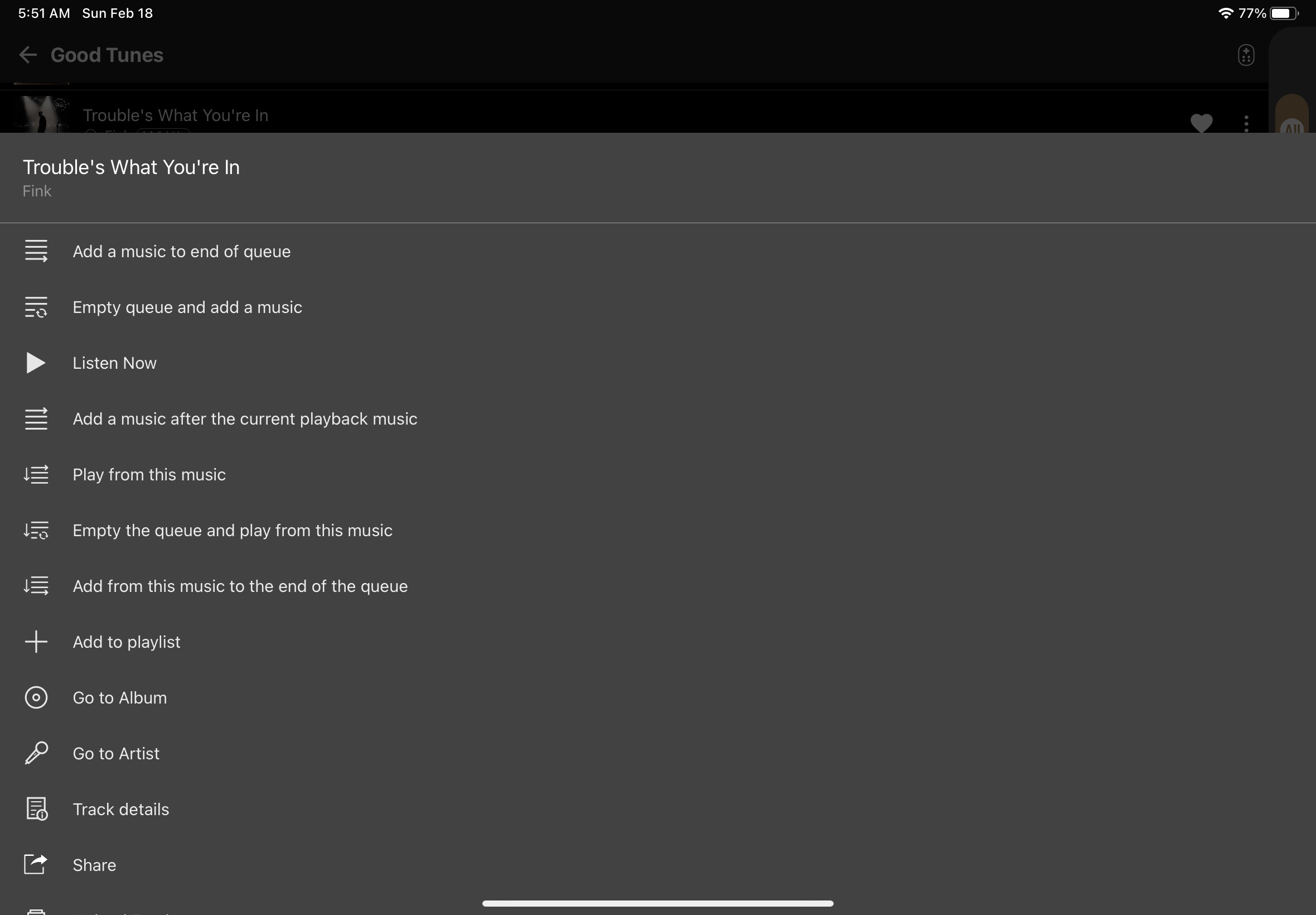
If I tap the 3 dots next to the heart all the way to the right of any song a menu pops up (shown in the 2nd shot for the song Trouble’s What You’re In). I can select any of the options shown. This works for any song whether in a playlist, or just in Qobuz, or on my SSD, etc.
Also I can tap any song and it will put that song in the queue. Depending how you configure under Settings/Audio Settings/Music Playback Options, it will do whichever of the options you configure (same options as shown in the 2nd shot).
Also I can tap the PLAY icon of the playlist and it will add the entire playlist to the queue.
Also I can tap the PLAY icon of any album and it will add the entire album to the queue.
Songs in the queue will be played one by one, in order.
This is almost exactly how the Innuos Sense app works except with Sense there are no options to configure; if you tap a song it empties the queue and plays the song (effectively this is the “empty queue and add music option).