New app: Rose One

Hello @alessandro ,

Thank you for your candid feedback regarding the ROSETUBE playlist interface.

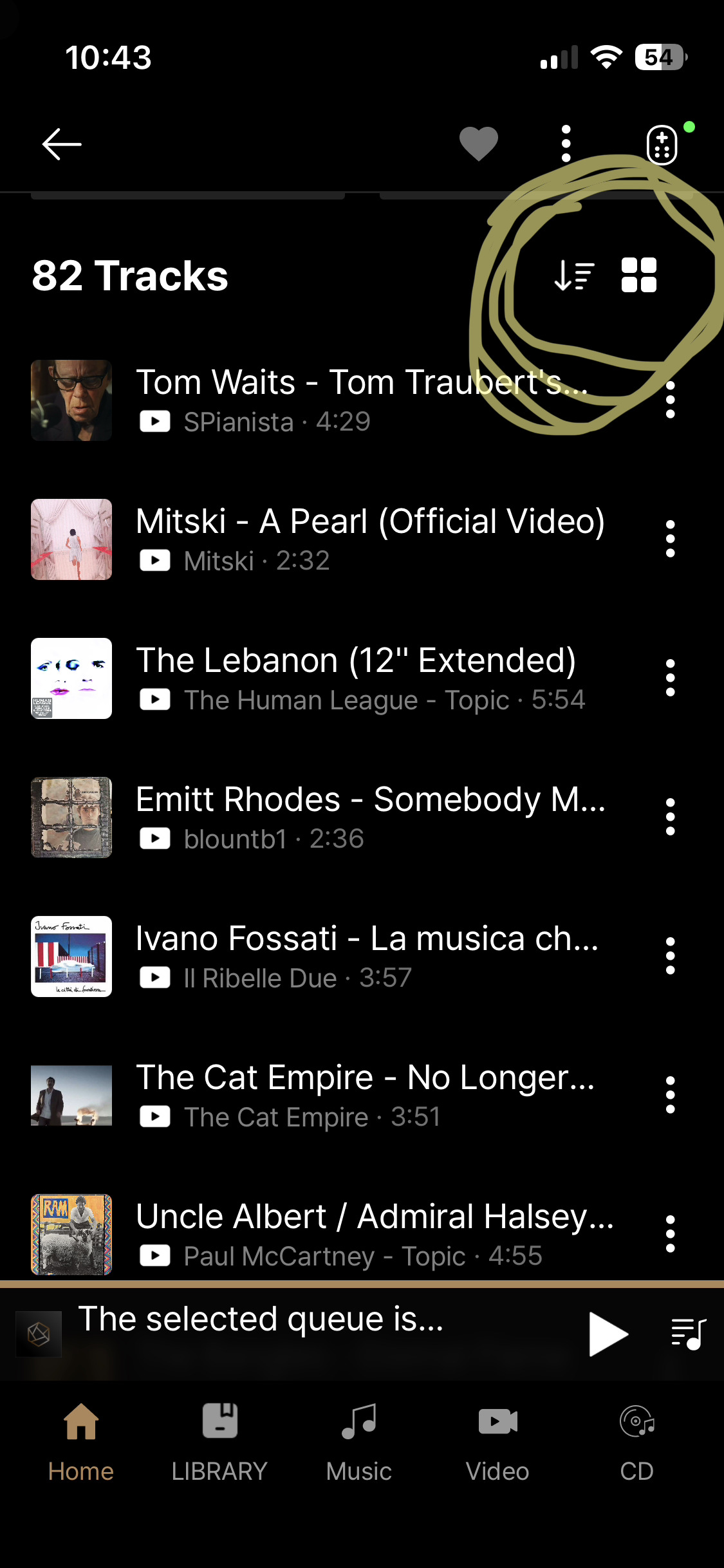
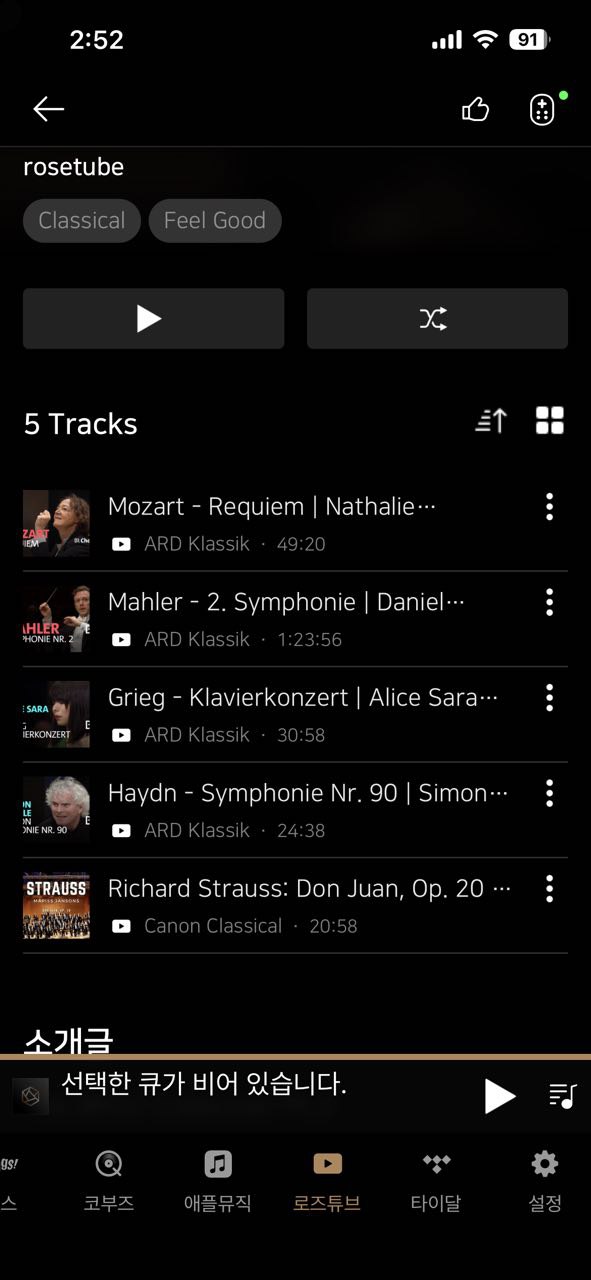
The current thumbnail-based design in ROSETUBE was an intentional choice, aimed at providing a visually rich experience with large album art as its core concept.

However, we are closely monitoring user feedback like yours regarding the navigation and ease of use for long playlists. Your suggestion to apply a list-view similar to the MUSIC menu is very valuable to us, and we will share this with our design and development teams for further review.

Thank you for helping us improve the Rose experience.

Best regards,
The RoseOne PC version (Windows/Mac) is currently being prepared for release. Please wait a little longer.

1 Like

Hello PatriceP,

Thank you for your candid and detailed feedback regarding the playlist management issues. We take your concerns seriously and would like to investigate this matter further to improve our service.

To better understand the situation you described, could you please provide us with some additional details?

  1. Clarification on Missing Tracks: You mentioned that when scrolling through a 300-track playlist, a significant portion is missing. Just to confirm, do these tracks fail to load entirely as you scroll down?
  2. App Versions: Does this issue occur consistently on both Rose Connect Premium and the new Rose One app?
  3. Source Platform: Which streaming platform are the tracks in that playlist from? (e.g., Qobuz, Tidal, RoseTube, etc.)
  4. Consistency: Does this happen with every playlist you have, or is it limited to specific large playlists?
  5. Visual Evidence: If possible, could you share a photo or a short screen recording showing the missing tracks? This would be immensely helpful for our development team to identify the root cause.

We sincerely apologize for the inconvenience and appreciate your valuable.

Best regards,

We are currently testing a feature that re-detects the Rose device’s IP address based on its MAC address if the IP address changes. We will let you know once it is included in the next version.

1 Like

@mjkim It is working fine now, thank you, but my version was already 1.0.9.3

Thanks for advise.
All Vu meters, except right bottom one (old school design) are free to choice.
When choosing that new one, last selected freeze, and restart is neccessary.
Unit restarts, when booted a message appear:
ā€žRestart for proper work for VU metersā€œ, i did twice, but same issue.

My RS130 is in language german.

Thank you @ROSELOA - I understand your explanation and background but - honestly - shouldn’t you strive for consistency across the Rose One App?

Why creating a different design for playlists on ROSETUBE than the design on MUSIC?

Which other brand does that as well?

Which Head of Design in any company allows different variations?

Why confusing your users with what you describe as ā€œvisual rich experienceā€. Really? On a smartphone it doesn’t look good at all because there is a limit to how many thumbnails you can show on a small screen…so whoever designed this should understand such a simple principle of visual comprehension…

I appreciate the intent but there are limitations to what a tablet or a smartphone can allow to show on a small screen, so please apply consistency across the App and - PLEASE - pursue this time EASE of USE and USER FRIENDLY design solutions.

Please avoid the horrors we had to endure and put up with the Rose Connect Premium App and keep your designers aligned!

When it’s very well thought and executed, ā€œdesign disappears with useā€ā€¦!

The feature you mentioned has already been applied in version 1.0.9.3.
(The design concept was to differentiate audio tracks and video content by displaying them differently. In the current version, this has been implemented so that users can choose how they would like to view them.)

The RoseOne PC version (Windows/Mac) is currently being prepared for release. Please wait a little longer.

@mjkim

Well done, when in doubt, leave users an option to choose.

Although this has been a very long process (I have been asking about this for years), I am glad that - with this new App - you have finally implemented these two options highlighted in the picture below:

  • allowing users to create a playlist/compilation following a sequential order
  • allowing users to view playlists as a list (as opposed to thumbnails)

On this last point, I understand your intention (you wanna differentiate because these are video tracks) but I still feel that it’s one of those things that sounds good in principle but - once it is executed in design - it doesn’t grant much merit. Surely any playlist contains more than 20 tracks, so perhaps populating a small screen (such as a smartphone one) with thumbnails might be the antithesis of simplicity and ease of use/navigation. Even in the example you have shared here, there’s ā€œspaceā€ for just 4 thumbnails on any smartphone’s screen. Is that good design? Oh well.

@mjkim Once the 100-tracks issue has been solved, it remains to fix the 10-tracks one. Sometimes, when playing an album in Qobuz with the Rose One app and selecting ā€œGo to albumā€ in the three dots menu , only the first 10 tracks appear in the list. It is absolutely randomly since some other times all tracks are shown. I have exhibited an image in a previous post.

Różana

With the latest Rose One update, the volume potentiometers have been improved, and each corresponds to the one shown in the photo. The Rose Tube is working fine so far and I haven’t had any problems. However, there’s still a volume error on individual outputs. The difference is 2000 compared to what’s set on the device. So, if the device is set to 4000, the Rose One app shows 6000. Everything is fine in the RCP app, but the error occurs in the Rose One app. There’s no way to change this. If I set the app to 4000, the device shows 2000. The device is a Rose RS 151.

Hello @Christian ,

The current design of the Qobuz album view is intended as part of the interface. While there is no option to change it at the moment, we are actively listening to feedback from our users for future improvements.

Regarding the VU meter issue you mentioned:

  1. Could you please provide a photo of the specific VU meter or a short video showing the issue occurring? This will greatly help our technical team in identifying the cause.
  2. Could you also share the ROSE ID of your RS130?(Path: RS130 > Settings > System Info > ROSE ID)

Thank you.

Hello,

Thank you very much for providing such a detailed explanation.

We will look into this issue immediately and do our best to ensure it is fixed as quickly as possible. We truly appreciate your feedback.

Best regards,

Dear Alessandro,

Please accept my sincere apologies for the confusion caused by my previous response.

I would like to clarify that the points you mentioned regarding UI consistency have already been incorporated into the latest update, as mjkim previously stated. My earlier message was misleading, and I am sorry for any frustration this may have caused.

Thank you for your patience and for holding us to a high standard.

Best regards,

Thank you @ROSELOA, it’s no problem.

I am just glad that - eventually - you guys are implementing more user friendly fixes to the overall user experience with the developments of the new App.

So well done and keep going with making it better for all people here who own HiFi Rose products.

2 Likes

Hello,

In Qobuz, albums should be sorted in release order, like in Tidal.

Thanks,

Ok on the volume issue… Here’s what I found…

On the Rose Connect that runs on the mac… when you set the volume, there’s a popup icon that is supposed to reflect the volume changing. Its stuck on the setting when the app first started.

On the Rose One… when you change the volume, the popup shows the correct volume. Its just there to highlight it. The reason I can’t get a screen shot of the rose connect (mac) version is that the minute I move the cursor off the app the pop up goes away.

So its not an issue w Rose One.

Pretty sure its an easy fix… but if Rose One replaces the Connect on the mac or pc … its a moot point.

Różana

I hope you will quickly deal with this volume error on the outputs, as the problem has already been reported several times and it is very annoying because you have to go to the device every time you want to change the volume on a given output.

Hello @Cougar2025 ,

The issue has been resolved and is currently undergoing final testing. We expect to release the update including this fix within this week. Thank you for your patience.

1 Like