New app: Rose One

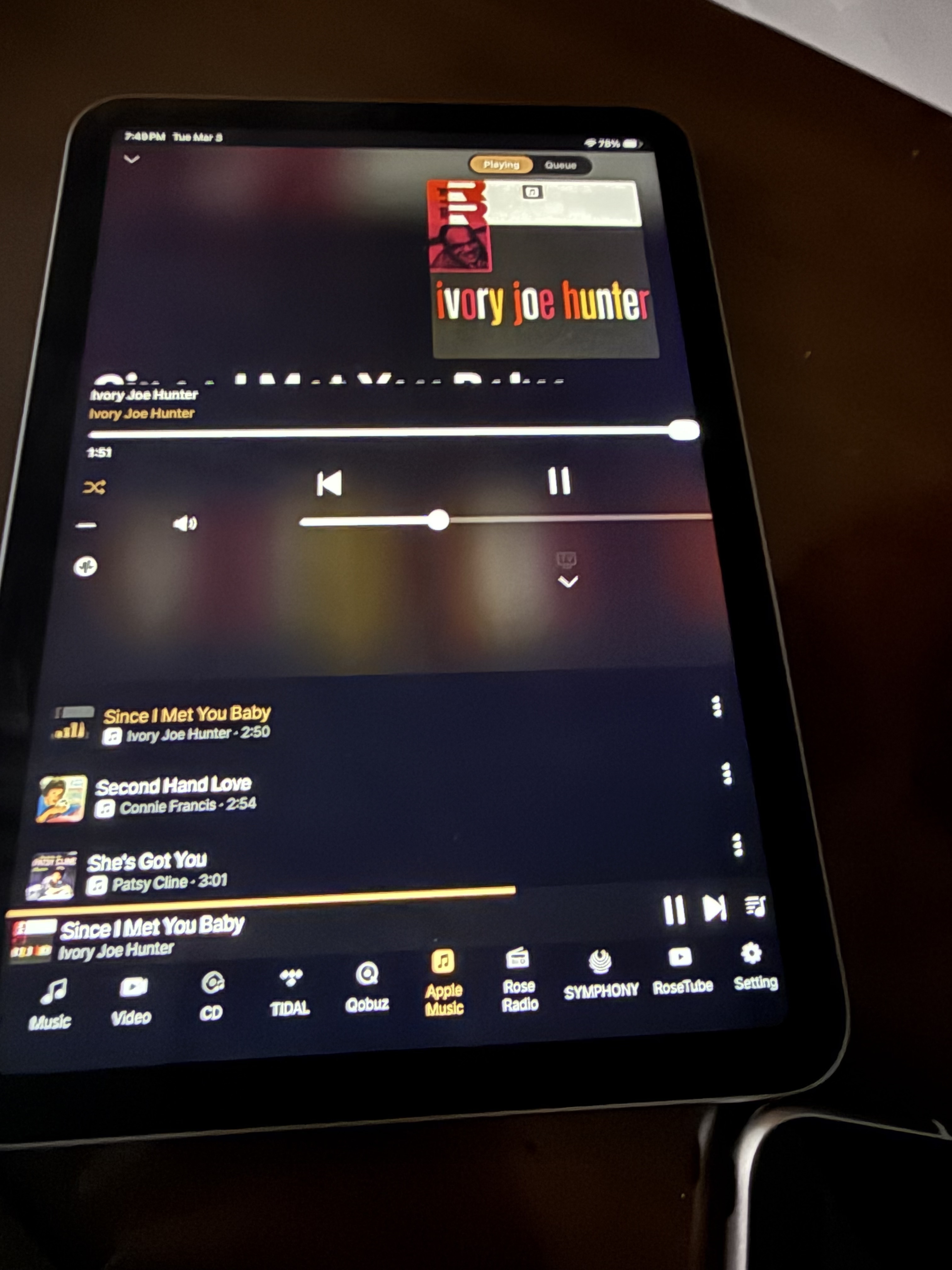
I’m very pleased with the RoseOne App. I do have an input for a correction. I have a new iPad Mini. When playing music through the iPad Mini on the Rose Radio App, the scrolling lyrics of he music are cut off and barely visible.
Can this be corrected, please.

StandardModel

Rose Radio does not have a lyrics view feature. Could you please capture a screenshot of the screen where the issue is occurring?

There is currently no synchronization processing between the EQ adjustment screen and the Set and Connect apps.
Please use the EQ adjustment screen as the reference.

There is currently no synchronization processing between the EQ adjustment screen and the Set and Connect apps.
Please use the EQ adjustment screen as the reference.

@alessandro

Additionally, please check the following:

  1. The first photo cannot be reproduced on our side. Could you please send an image of the situation before the issue occurred? (The translation issue has been corrected and will be applied in the next version.)
  2. The second photo shows the screen that appears when the Wi-Fi connection is disconnected. Could you please check your network connection again?

Here you can see just the very top of the letters. I you need it I have a full size iPad where the lyrics scroll by nicely.

StandardModel

1 Like

Hi,
There are two issues.

  1. The lack of synchronization where if you update using Rose One, you won’t see the update until you refresh that page. (exiting and re-entering.)

  2. Rose One will not see the changes until you exit fully from the app and restart it.

Now for #1) Its not really much of an issue because you wouldn’t really have both the app and the screen attempting to set the EQ. You would use one or the other.

For #2) This is an issue because you could have the app open in the background and if someone changes the EQ, you won’t see the change unless you restarted the App.

There are ways you could synchronize the app and the unit. (e.g. a thread that manages an event stream in both the app and the unit.)

@mjkim @Smegel

Thanks for your replies and your input. Much appreciated.

On the Rose Connect Premium App I can change the Equalizer from “Basic” to another genre. When I reboot my RS 520 that change is reflected on the display. Conversely, when I alter the genre on the 520, that change is reflected in the app next time I activate Rose Connect Premium.

Using the Rose One app the pointer is stuck on the “Basic”’setting. I cannot move it. Therefore, I’m unable to change the genre using Rose One like I can in Rose Connect Premium. I am still able to change the genre from the display of the 520 and that change is reflected the next time I start up Rose One.

My wish is that changes in the Equalizer settings should be reflected instantly whether from Rose One to the 520 or vice-versa.

The real benefit of being able to instantly hear changes on the equaliser settings made directly on the app, as opposed to the 520, would be that any changes to sound quality would be heard from the listening position.
Having to go back and forth, and then down my knees, to the unit each time I want to tweak something on the equaliser is inconvenient and not great for my ageing joints !

I don’t think it’s a big ask and I hope an OTA update can provide a solution.

In the next version, we will add a feature to synchronize the EQ settings with the set when entering the RoseOne app from the background. Thank you for your assistance.

1 Like

When you press EQ on/off again, does the sound still not change?

We have identified an issue where the on/off synchronization is not working properly. We will fix this in the next version. Thank you for your assistance.

Based on the attached photo, it appears that screen rotation has not been applied.
Even if you rotate the device, does it continue to display as shown in the photo?
Could you please let us know the model name of the device you are using?

mjkim,

Yes, even if you apply screen rotation, the device continues to cut off the lyrics.
The device is an Apple iPad Mini (A17Pro)
Model No MXN63LL/A and it’s about six months old.
I also have new full size Apple iPad which does not cut off the lyrics.

StandardModel

Silly question:???

Did you change the text size on your iPad?

@mjkim

Thanks for your reply.

The on/ off synchronisation is not working.

This morning 09.00 GMT, to my pleasant surprise, everything was working perfectly with the equaliser. Changes in the RS520 were reflected in Rose One and, most significantly, changes in Rose One were reflected on the RS520 display.

Now, some four hours later, I am back to the situation where Rose One is locked on “Basic” once again and I am unable to operate the equaliser via the app. In other words, I am back to where we started.

What’s happening ?

@mjkim

One other thing I have noticed using Rose One in the past few days.
The app works very smoothly and quickly when using my iPhone 16 ( iOS 26.3).
When using my older iPad (9th Generation) (iOS 26.3) it constantly freezes.

I think this issue has been reported by others on the forum but this is the first time I have had such major issues which is why I am bringing them to your attention.

There’s a new iOS update and Rose said that they are updating the app w some changes.
Tha could be it.

@ Smegel

I am using Rose One v. 1.0.10.
Just checked with App Store and it’s still showing as the latest.

There seems to be a pattern emerging of an update to Rose One at the end of each week so a fix could be just around the corner !

I’m ever the eternal optimist !

Bonte,

Good suggestion. If only.
No, this is a programming glitch.

StandardModel

Okay, big guy.

I’ve had that happen to me before, in an app.

Where the hell did the login go!!!

Until I remembered that I had enlarged the text and the login window had disappeared as a result.

Well, it was a stupid question!

But it could have been.

Have a nice evening…

1 Like

This could be one of those… did you remember to reboot your system?

1 Like