
I hope the update works for you JMBARG. It might improve your demeanor. Fingers crossed.
Sorry Jose, I just happen to be a satisfied customer.
I did the update this morning. (Ironically I don’t think you see the update notification unless you power off the unit rather than just go into standby. )
Like Before, I don’t have any major issues… so far.
I agree that if you paid thousands of dollars for a piece of equipment, you should be satisfied.
But here’s the thing.
You’re the only one who is having this specific issue.
A population size of one isn’t enough to draw any conclusion.
I understand how you feel… but unless someone else has a similar issue… what do you expect Rose to do?
1 Like
Update went fine, both units still work and had even kept output settings this time.
One thing noticed is that while every other VU Meter style works, needles moving furiously, the colored bars style doesn’t. It just stays flat, whether Input or Output is specified in VU settings.
There’s always something, huh! How incredible that everything they touch, they break, and sometimes, they improve!
The latter happens quite occasionally though, while the former quite consistently…
On both 250 and 520, the horizontal bar style VU Meter does not move. Same track, at the same time, produces quite noticeable movement in all needle-style meters.
And speaking of broken things, the 520 kept the Qobuz login. The 250 required me to log in again. But of course logging from the device did not work. You can enter the username and password (of course removing the “User name” and “Password” hints from input boxes, once you start typing, would be too much to ask, so you can’t even easily see how many characters you have typed) but clicking the login button does not do anything. But… but… if you hold it you can select a word inside the button and get the standard Android pop-up. Can even do a web search for the selected word (opens Chrome just fine). Just not logging in. At least that worked from the app, but still annoying if not totally unexpected.
JMBARG
No, buddy, you wrote more than once that the new software changed the filters and that this meant you couldn’t listen to music with your favorite filter.
So I decided to play around with the pre-update filters, as I haven’t updated yet, and in my opinion, the differences are very subtle. I play guitar, and I also do it by ear. I suspect you don’t play any musical instruments, so your hearing probably isn’t any better than mine. So, in my opinion, that’s not the reason your device sounds worse after changing the filters. Because the difference in filters before the update, I’ll repeat, is very, very tiny.
I never said it changes the filters, it seems to me that from programming so many applications your eyesight is tired.
They never did properly…
At least they moved around.
To HiFi Rose Technical team
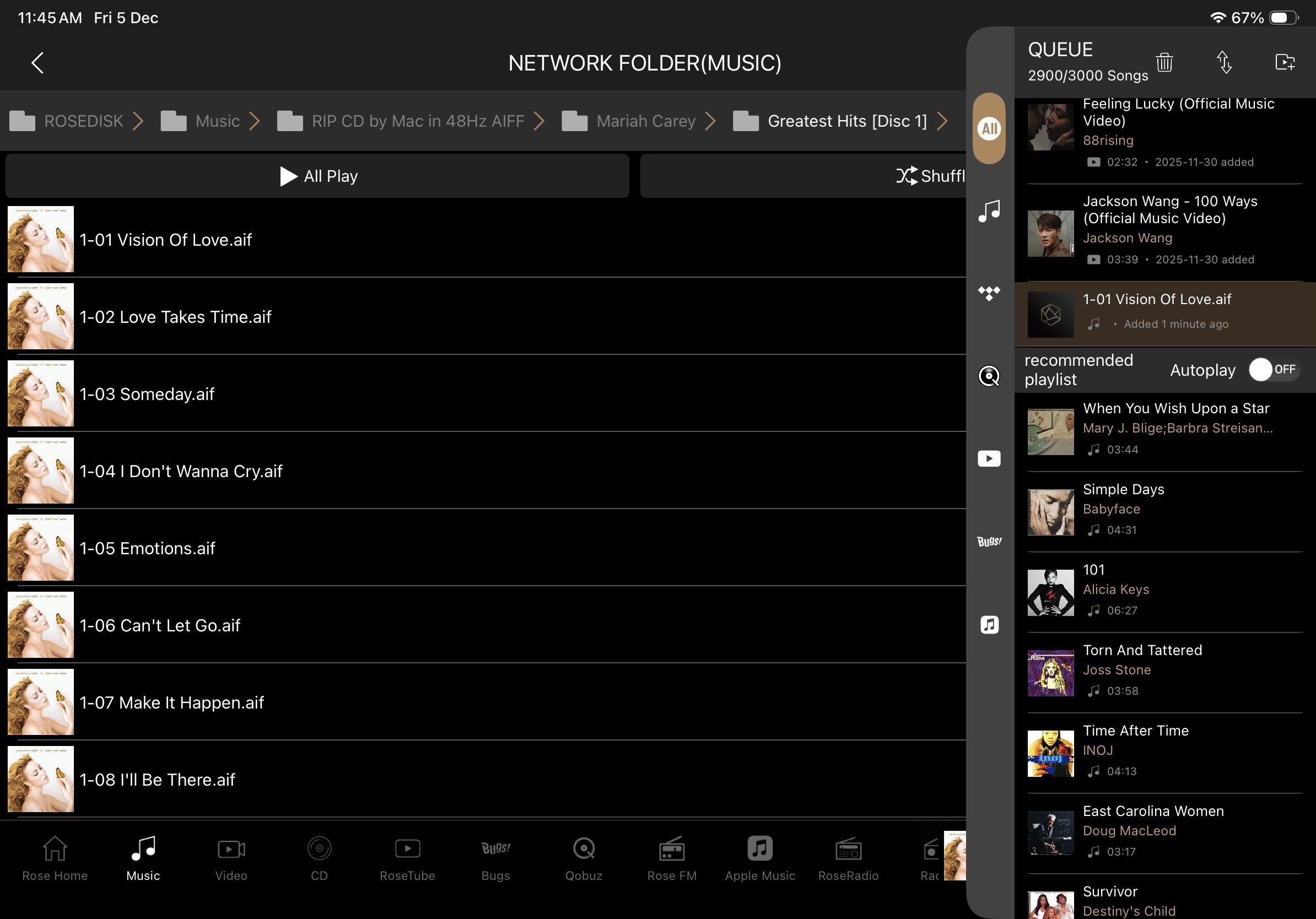
The previous of the album artwork cannot display on queue playlists if add the track or album from select directly from Folder. BTW, I am using Rose Connect Premium Apps Version 5.09.41 on my iPad Pro. Details please see the 1-01 Vision of Love file name on right hand side playlist from attached photo below:
This issue has now been forwarded to our software team.
We will notify you once a fix or update becomes available.
@Georgie
Thank you for sharing your issue. We’ve fixed it, and we’ll leave a comment once it’s released after App Store review.
@Georgie
We’ve fixed the issues and released it on the iOS App Store. Please download and check.
3 Likes
Hi Jimbarg,
hope you doing well. What is the last status auf you update with RS151? Any Progress?
BR
Jens
Hi, Hans how are you?
Sorry for the delay in replying, my account was suspended for a while; there are crybabies and little girls who tell their moms everything.
The people at HiFi Rose very kindly sent me a series of files to install, which solved a problem I had with DFF audio files and also the latest update. I did everything using a USB drive formatted in FAT32 and so far, everything is working very well.
Jose, remind us again, what problem were you having?
So the SQ problem was related to the music file format? Well I am glad it is resolved and that you can enjoy your music again.
I had two problems:
-
The previous software update modified the outputs and altered the DAC’s operation; I’m referring to version 5.9 - Rose OS 5.9.07 - Rose Main 5.9.07.1 - Rose Service 5.9.07.1, although the people at HiFi Rose vehemently defend that this update didn’t affect the operation of my RS151. Anyway.
-
I couldn’t play DFF files; when I tried, the audio output was just a jumble of noise.
What happened? I was given a link to download a firmware update, or something like that, and also the November update. Now the DFF files play fine, and the audio is more or less there.
In my case, I use the RS151 and my previous RS250A as a DAC with a display to browse the folders on my hard drive and listen to my music in the following formats: DSD, SACD ISO, DFF, 32-bit PCM WAV, and 24-bit PCM WAV. All my music has a minimum frequency response of DR10; below DR10, I can’t hear anything and I’m not interested in doing so. I’ve mentioned this about not connecting the equipment to the internet several times.
Hi JMBARG, great to hear that your RS151 is running smoothly again! I don’t have the last post in front of me, but if I remember correctly, you were dealing with the DAC being heavily changed with the Kaos Update 5.9.07. I also ran into issues with 5.9.07—some random shutdowns, incorrect screen displays, and what felt like a hundred more errors :(. How did you manage to fix the problem with your DAC? Did you get a “JMBARG” custom firmware update? Could you share a bit more about that?
In the meantime, I hope you’re enjoying the rest of the christmas season! Ho Ho Ho  )
)
It’s not a custom update; the people at HiFi Rose sent me a link to download a file that solves my problem playing DFF files.