
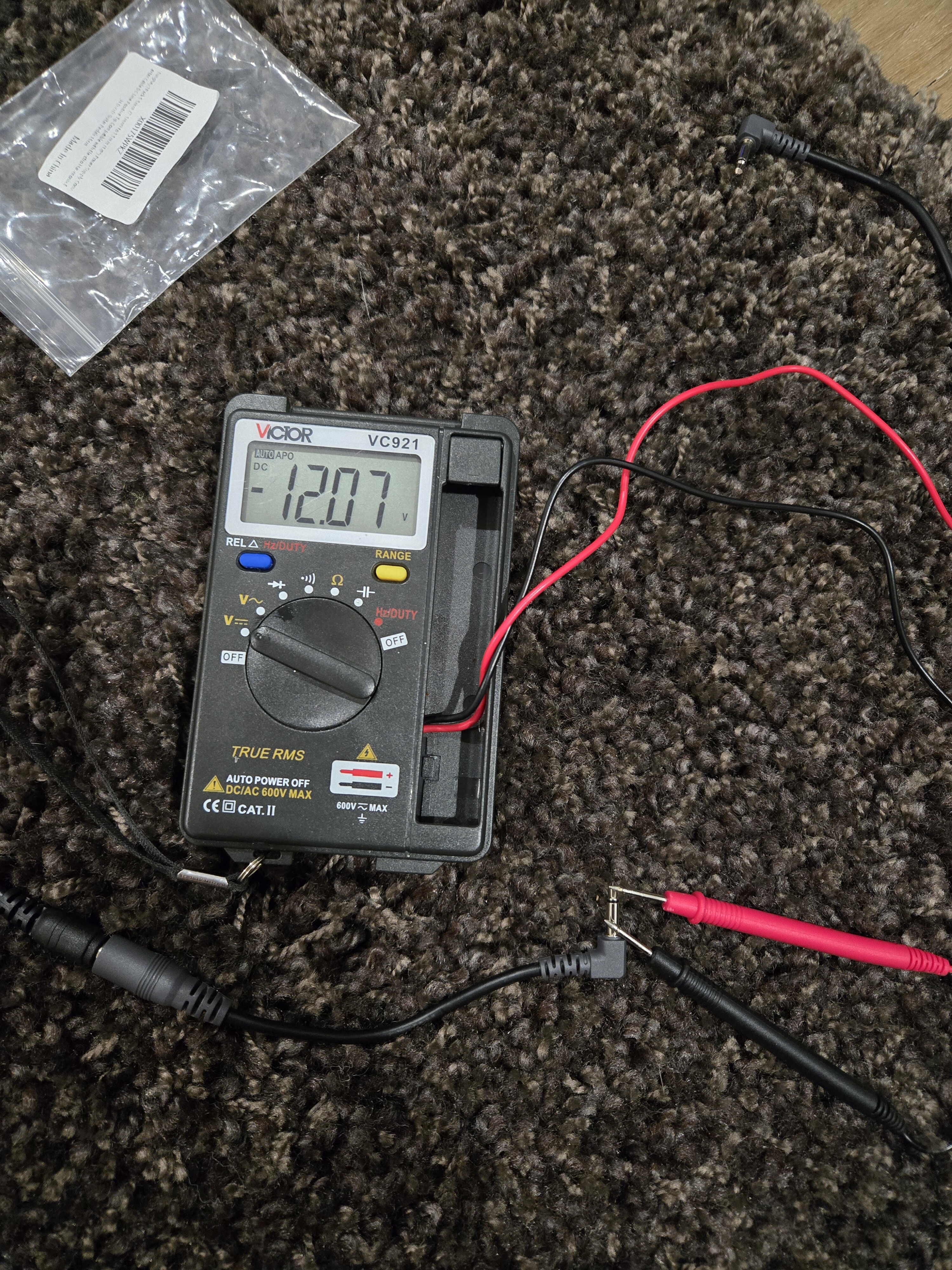
I can help answer as I had the same issue. I found out the mono plug had reverse polarity meaning the voltage output was reverse -12v probably manufacturer error. You can either cut it and rewire. Or buy another cable hopefully they wire it correctly
1 Like
Thank you that’s very helpful. Can you advise what brand you purchased and from where ?
I just purchased the USB to barrel adapter (Farsense), but did not buy the 3.5mm adapter, as I have some 3.5mm tips laying around. Can someone please confirm the correct polarity? The 3.5mm tip is positive?
Thanks!
Yes, the tip is positive.
1 Like
But the 130 has no trigger out. Is it possible to start the rs 130 en RD 160 together.
Is this also possible for the hifirose rd 160 dac with hifirose rs130 sreamer. How can I connect the dac to a network?
Scroll up, this is already answered (using farsense USB to 3.5mm). You connect the RS130 USB to the RD160 trigger in, then the RD160 trigger out to the RA180 trigger in.
I have only the RS 130 streamer en the rd160 dac no rose amp. I have the cable connected.
But when I turn on the streamer. Nothing happends with the dac.
Whats going wrong.
Do as Tom said:
So when the RS130 goes into standby mode, it powers down the USB port. When it turns on it powers on the USB port which gives you the 12v trigger signal.
1 Like
I heard the latest update removed this feature of turning off and on the usb ports. I have not yet updated. Can anyone confirm?
This is what Rosehan said about the update yesterday:
Dear HiFi Rose users
I have already forwarded the points you mentioned above to our software and hardware teams. They told me they will prepare and provide me with a response as soon as possible.
Additionally, here are the details of the Rose OS 5.9.09 update:
- Fixed an issue where Roon users could not wake up the device after entering standby mode from the Roon settings.
- Fixed an issue where the weather refresh notification was continuously displayed when using AOD (Always On Display).
- Fixed an issue where the album cover did not update when switching tracks during Roon playback.
- Improved stability of Music Cache on RS130.
- Fixed an issue where, after playing Spotify during Tidal playback and then returning to Tidal, the selected queue appeared as empty.
6. Improvement so that for Wi-Fi users, USB/SSD power is always enabled.
Quick question…, can all 3 devices RD160/RS130/RSA720 connect together by SFP?
No, the RD160, RS130, and RSA720 cannot all be connected together via SFP.
Here is how SFP works in the HiFi Rose lineup:
SFP is designed for a point-to-point connection, primarily between:
RS130 (network transport) ↔ RD160 (DAC)
The RSA720 does not support SFP input/output, so it cannot participate in an SFP chain.
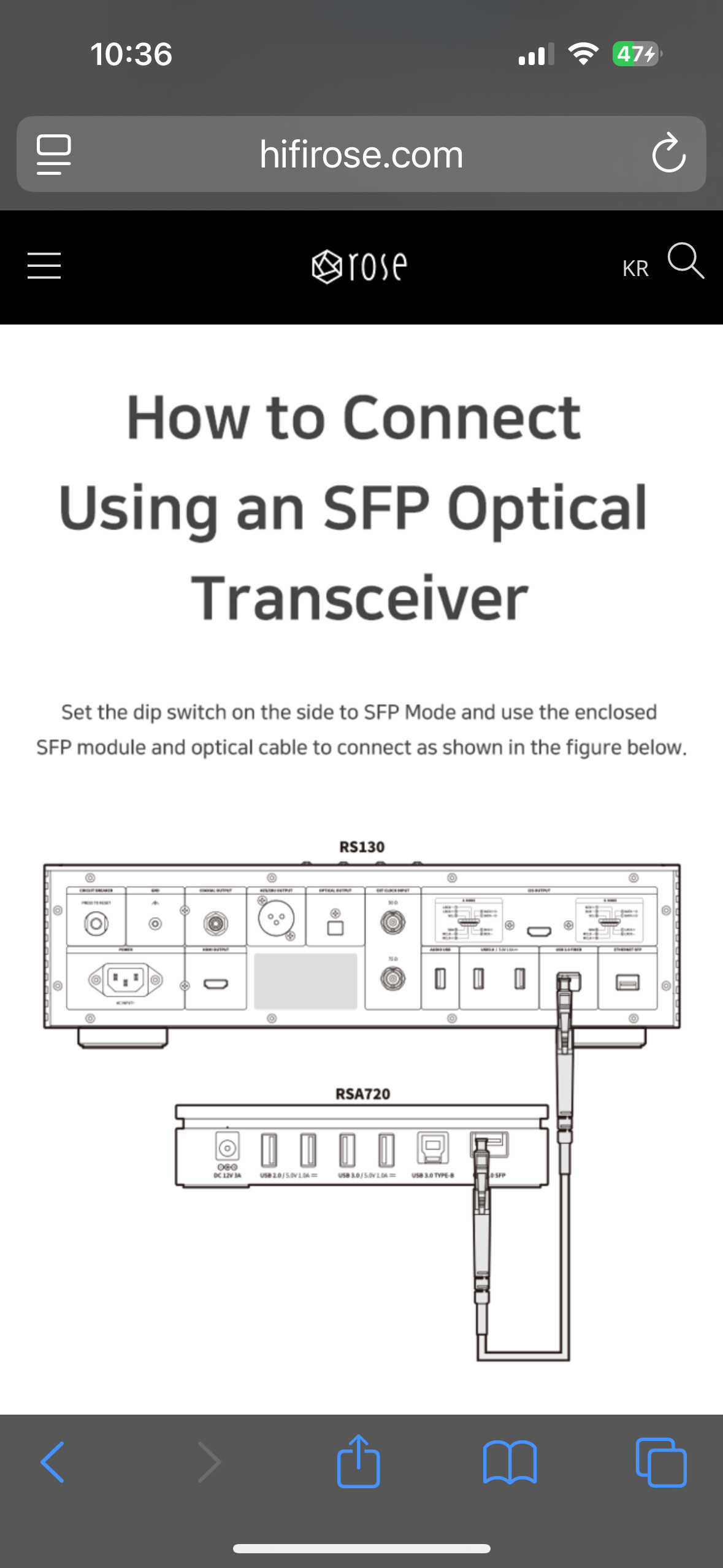
Thanks for the reply but there’s a diagram shows how to connect RSA720 with RS130 via SFP connector as per user manual
We’re glad to hear that the issue has been resolved.
If you have any other questions or encounter additional issues in the future, please feel free to let us know.
Hello, sorry for delay but the issue wasn’t solved although I showed you the diagram to connect the CD player to the rs130 but what about the connection between rs130 to rd160 using SFP since there is only 1 SFP outlet on rs130? That means the SFP connection can be done either rs130 to rd160 or rs130 to rsa720 not all 3 together by SFP cable?
Hello, thank you for your inquiry.
The RS130 is equipped with only one SFP port, so as you mentioned, an SFP connection can be made with only one device at a time.
That means:
- RS130 to RD160 via SFP, or
- RS130 to RSA720 via SFP
You must choose one of these connections, and it is not possible to connect all three devices (RS130, RD160, and RSA720) simultaneously using SFP cables.
If you need to connect additional devices, please use other available interfaces such as USB, coaxial, or optical connections for the remaining components.
If you would like further assistance with system configuration or recommended setups, please feel free to share your full system details and we will be happy to help.
1 Like
Ok, so I was struggling with the same issues. Normal trigger cable, then new cable with step up voltage and adapter am still nothing. I did have the green light on tbr USB. If what I read earlier in this thread is to be believed, the USB OFF/ON/AUTO has been changed. Regardless, no amount of patience, angst, anger or frustration (or money) has solved the issue.
However, I did end up with another workable solution. The RS130 hdmi video goes to the tv via my processor (AVM 90). I had already configured an input for “Rose Analogue” (video input is HDMI and audio input is none. The AVM has 3 trigger outs, and one can be set to trigger when a specific input is selected. Therefore using a normal trigger cable from AVM to RD160 turns on the DAC when I select “Rose Analogue”. I already have a trigger to turn on the RA180 under all circumstances - it powers stereo music and also L&R for movies via HR bypass.
It’s not as elegant as a direct solution, but it works. I turn on the RS130 either via the app or ROON which triggers the RA180 and then select Rose Analogue which triggers the RD160.
I hope that helps someone….
1 Like
Thank you very much for sharing your detailed experience and workaround.
We truly appreciate the time and effort you put into finding a solution and explaining your setup. Your configuration using the AVM 90 trigger output is very helpful and may benefit other users as well.
We will review the USB OFF/ON/AUTO behavior and trigger interaction internally to see how we can improve stability and usability.
Thank you again for your valuable feedback and for sharing your solution with the community.